Ahrefs Domain Rating set in type 25 Oct 2026, reset 25 Oct 2026.
WebP Converter metrics
Set in type for webp-converter.net: Ahrefs Domain Rating and Majestic link data, with the change since the last edition.
Metric
Value
Domain Rating
2● no change since last check
Trust Flow
4● no change since last check
Citation Flow
14● no change since last check
Referring domains
6● no change since last check
External backlinks
11● no change since last check
Ahrefs Domain Rating set in type 25 Oct 2026, reset 25 Oct 2026. Lead topic: Sports/Martial Arts (3). Majestic set 25 Oct 2026, reset 25 Oct 2026. Link data typeset by Majestic. Trust Flow, Citation Flow and Topical Trust Flow are trademarks of Majestic-12 Ltd.
A free, browser-based tool to convert between WebP, JPG, PNG and other image formats with batch processing and no server uploads.
The story so far
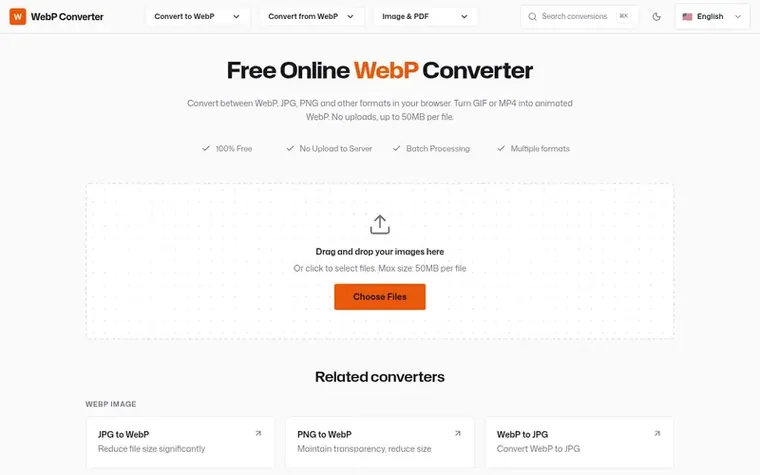
Homepage of WebP Converter
WebP Converter is a free online image conversion tool that runs entirely in your browser. It converts between WebP, JPG, PNG, GIF, BMP, TIFF, SVG and other formats without uploading files to servers. The tool supports batch processing of multiple images simultaneously and can convert animations from GIF and MP4 formats to WebP. Users can control output quality with a slider, and the service handles files up to 50MB per file depending on browser memory.
Typeset features
Convert between WebP, JPG, PNG, GIF, BMP, TIFF, SVG and other formats
WebP is a modern image format developed by Google that provides superior lossless and lossy compression for images on the web. WebP images are 25-35% smaller than comparable JPEG and PNG images while maintaining the same visual quality, and they support transparency and animation.
Is conversion free, and what are the limits?
Yes, conversion is completely free with no registration or watermarks required. The service supports files up to 50MB per file, with processing depending on browser memory.
Are my images uploaded to a server?
No, all processing happens locally in your browser with no files uploaded to any servers.
Can I convert multiple files at once?
Yes, the tool supports batch processing, allowing you to convert multiple files at once, upload them, convert them, and download all together.
How do I control the quality of the output?
You can use the quality slider to control the output file size. Higher quality means larger files.
Leave a review for WebP Converter
No review of WebP Converter set in type yet. Set the first.

 Shrinkpad
 RGB to CMYK Converter
 Threads Video Downloader
 FormatDrop