File converters

FormatDrop

Free browser-based file converter for images, audio, video, and documents

  • Community votes0
  • DR by Ahrefs14 no change since last check

Ahrefs Domain Rating set in type 25 Oct 2026, reset 25 Oct 2026.

FormatDrop metrics

Set in type for formatdrop.com: Ahrefs Domain Rating and Majestic link data, with the change since the last edition.
MetricValue
Domain Rating14 no change since last check
Trust Flow7 no change since last check
Citation Flow23 no change since last check
Referring domains29 no change since last check
External backlinks228 no change since last check

Ahrefs Domain Rating set in type 25 Oct 2026, reset 25 Oct 2026. Lead topic: Computers/Internet/On the Web (7). Majestic set 25 Oct 2026, reset 25 Oct 2026. Link data typeset by Majestic. Trust Flow, Citation Flow and Topical Trust Flow are trademarks of Majestic-12 Ltd.

FormatDrop domain colophon

From the registry's public RDAP record, checked 25 Oct 2026, 17:56 UTC.
Domain age6 months
Registered
Expires
RegistrarHOSTINGER operations, UAB
DNSSECNot signed

Full colophon for formatdrop.com

Convert images, video, audio, and documents free in your browser with 200+ format pairs. No signup, no uploads, no watermarks on Pro.

The story so far

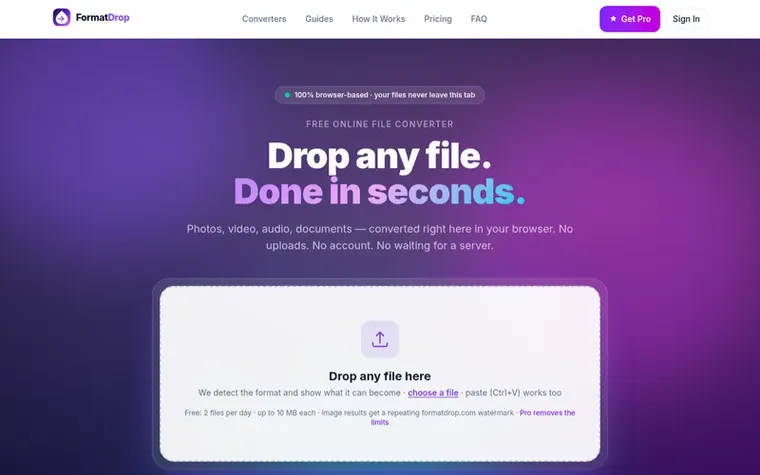
Screenshot of the FormatDrop homepage
Homepage of FormatDrop

FormatDrop is a free browser-based file converter that processes all conversions locally on your device using WebAssembly. It supports over 200 conversion pairs across images, video, audio, and documents—including HEIC to JPG, PDF to PNG, MP4 to GIF, and DOCX to PDF.

The tool requires no signup, no file uploads, and no account. Files are processed entirely in your browser tab and never touch a server. The free tier allows 2 files per day up to 10 MB each with a watermark on images; Pro removes all limits (unlimited files, 500 MB per file, no watermarks) for $9.99/month or $49/year.

The service runs real production conversion engines including FFmpeg, LibRaw, PDF.js, and others directly inside your browser, delivering conversion speeds comparable to native apps while maintaining complete privacy by design.

Typeset features

  • 200+ format pairs supported
  • 100% client-side processing, files never leave your device
  • Batch conversion
  • Up to 500 MB per file on Pro
  • No watermarks on Pro and video/audio
  • Support for images, video, audio, and documents
  • Conversion speeds of 1-3 seconds typical for images
  • Works offline after converter engine is cached
  • Supports Chrome, Safari, Firefox, and Edge

Pricing

Pricing model: Freemium

Free: 2 files per day, 10 MB per file, watermark on images. Pro Monthly: $9.99/mo, unlimited files, 500 MB per file, no watermarks. Pro Yearly: $49/year (equivalent to $4.08/month), all Pro features billed annually.

See FormatDrop's full pricing (opens in a new tab)

Questions and answers

Are my files uploaded to servers?

No. Every conversion runs entirely in your browser on your device. There is no upload endpoint, no temporary storage, and no server that ever sees your files. You can verify this by opening DevTools, going to the Network tab, and converting a file—you will see zero upload requests.

What file formats does FormatDrop support?

FormatDrop supports 200+ conversion pairs across four categories: Images (JPG, PNG, WebP, AVIF, GIF, BMP, TIFF, HEIC, SVG, ICO, EPS, ARW), Video (MP4, MOV, AVI, MKV, WebM, WMV, GIF animated), Audio (MP3, WAV, OGG, FLAC, M4A, AAC, OPUS), and Documents (PDF, DOCX, PPTX, Pages, EPUB, SVG).

Is FormatDrop safe for confidential files?

Yes. Contracts, medical records, and private photos never travel over the network. The only server communication is Stripe for payments and Google OAuth for sign-in. File processing does not touch a server at all.

What does the Pro plan include?

Pro includes watermark-free image output, files up to 500 MB each (free is 10 MB), unlimited file conversions (free is 2 per day), no ads, and Pro status synced across all devices when signed in. It costs $9.99/month or $49/year.

Do I need an account to use FormatDrop?

No. You can convert files immediately without signing in. An account is only needed for Pro users who want their subscription synced across multiple devices.

Leave a review for FormatDrop

No review of FormatDrop set in type yet. Set the first.

Your rating

Reviews are free to set. None are paid for. Read the proofs

Readers' notes · Reprints · Share the page · Your company in print? Claim it · Report a misprint

More on this profile

FormatDrop has a free listing. The owner can unlock the full profile with a paid launch for $5:

  • Founder story (locked)
  • Milestones (locked)
  • Demo video (locked)
  • Dofollow website link (locked)

More pages like this

  1. Number 1: Shrinkpad logoShrinkpad

    Native macOS app for batch compressing images and videos with complete privacy

    File converters

    DR 25 no change since last check 0 votes. Log in to vote for Shrinkpad in print
  2. Number 2: RGB to CMYK Converter logoRGB to CMYK Converter

    Professional online tool for converting RGB images to CMYK color space for printing

    File convertersUnited States

  3. Number 3: Threads Video Downloader logoThreads Video Downloader

    Free tool to download Threads videos in HD without watermark

    File convertersIreland

  4. Number 4: Suno Downloader logoSuno Downloader

    Free tool to download public Suno AI songs as MP3 or MP4 files without signing up

    File converters

    DR 8 no change since last check 0 votes. Log in to vote for Suno Downloader in print
Help centre