Are my files uploaded to the cloud?
No. All compression happens 100% locally on your Mac. Your files never leave your device, and Shrinkpad has zero access to your images or videos.

File converters
Native macOS app for batch compressing images and videos with complete privacy
Ahrefs Domain Rating set in type 25 Oct 2026, reset 25 Oct 2026.
| Metric | Value |
|---|---|
| Domain Rating | 25 no change since last check |
| Trust Flow | 8 no change since last check |
| Citation Flow | 16 no change since last check |
| Referring domains | 94 no change since last check |
| External backlinks | 995 no change since last check |
Ahrefs Domain Rating set in type 25 Oct 2026, reset 25 Oct 2026. Lead topic: Computers/Software/Operating Systems (7). Majestic set 25 Oct 2026, reset 25 Oct 2026. Link data typeset by Majestic. Trust Flow, Citation Flow and Topical Trust Flow are trademarks of Majestic-12 Ltd.
| Domain age | 10 months |
|---|---|
| Registered | |
| Expires | |
| Registrar | CloudFlare, Inc. |
| DNSSEC | Not signed |
Shrinkpad is a macOS app that compresses images and videos in batches, running entirely on your device with no cloud uploads.
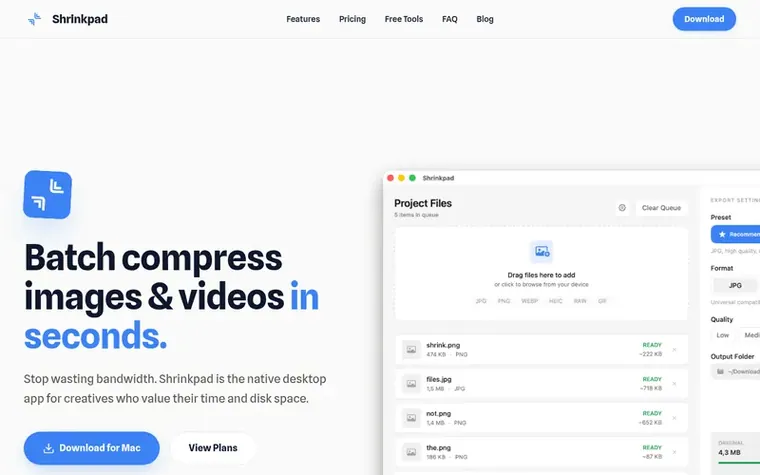
Shrinkpad is a native macOS application for batch compressing images and videos. It automatically analyzes visual complexity to apply optimal compression ratios without artifacts, reducing file sizes significantly while maintaining quality. The app processes files entirely on your local device with no cloud uploads, ensuring complete privacy for sensitive content.
Shrinkpad supports a wide range of formats including JPEG, PNG, WebP, HEIC, TIFF, GIF, BMP for images, and MP4, MOV, M4V, AVI, MKV for videos, plus over 30 RAW camera formats. Users can process files individually or drop entire folders to compress thousands of assets at once. The app offers fine-grained control over compression settings, with options to adjust quality levels, choose between lossy and lossless compression, set maximum dimensions, and configure output formats.
Pricing model: Freemium
Free Starter (free, 10 files per batch, standard compression), Personal ($14 one-time payment, 1 device, unlimited batch processing), Team ($35 one-time payment, 10 device licenses)
No. All compression happens 100% locally on your Mac. Your files never leave your device, and Shrinkpad has zero access to your images or videos.
Shrinkpad supports JPEG, PNG, WebP, HEIC, TIFF, GIF, and BMP for images. For videos: MP4, MOV, M4V, AVI, and MKV. It also supports 30+ RAW camera formats including CR2, CR3, NEF, NRW, ARW, SRF, SR2, DNG, and many more.
With the free tier, you can process up to 10 files per batch. With a Personal or Team license, there is no limit and you can process hundreds or thousands of files in a single batch.
Yes, Shrinkpad offers a 7-day money-back guarantee. If you are not satisfied for any reason, simply email support@shrinkpad.app within 7 days of purchase with your purchase date and order details for a full refund.
Yes! Shrinkpad offers a free tier that lets you compress up to 10 files per batch with standard compression settings. It's perfect for trying out the app or occasional use. For unlimited batch processing, all formats, and advanced controls, you can upgrade to a Personal or Team license.
No review of Shrinkpad set in type yet. Set the first.
Reviews are free to set. None are paid for. Read the proofs
Readers' notes · Reprints · Share the page · Your company in print? Claim it · Report a misprint
Shrinkpad has a free listing. The owner can unlock the full profile with a paid launch for $5:
 RGB to CMYK Converter
Professional online tool for converting RGB images to CMYK color space for printing
 Threads Video Downloader
Free tool to download Threads videos in HD without watermark
 FormatDrop
Free browser-based file converter for images, audio, video, and documents
 Suno Downloader
Free tool to download public Suno AI songs as MP3 or MP4 files without signing up
Can we set one analytics cookie to count which pages readers flip to? Nothing is set unless you say yes. Privacy