Ahrefs Domain Rating set in type 25 Oct 2026, reset 25 Oct 2026.
RGB to CMYK Converter metrics
Set in type for rgbtocmyk.net: Ahrefs Domain Rating and Majestic link data, with the change since the last edition.
Metric
Value
Domain Rating
26● no change since last check
Trust Flow
8● no change since last check
Citation Flow
24● no change since last check
Referring domains
104● no change since last check
External backlinks
4,356● no change since last check
Ahrefs Domain Rating set in type 25 Oct 2026, reset 25 Oct 2026. Lead topic: Computers/Internet/On the Web (7). Majestic set 25 Oct 2026, reset 25 Oct 2026. Link data typeset by Majestic. Trust Flow, Citation Flow and Topical Trust Flow are trademarks of Majestic-12 Ltd.
RGB to CMYK Converter domain colophon
From the registry's public RDAP record, checked 25 Oct 2026, 18:12 UTC.
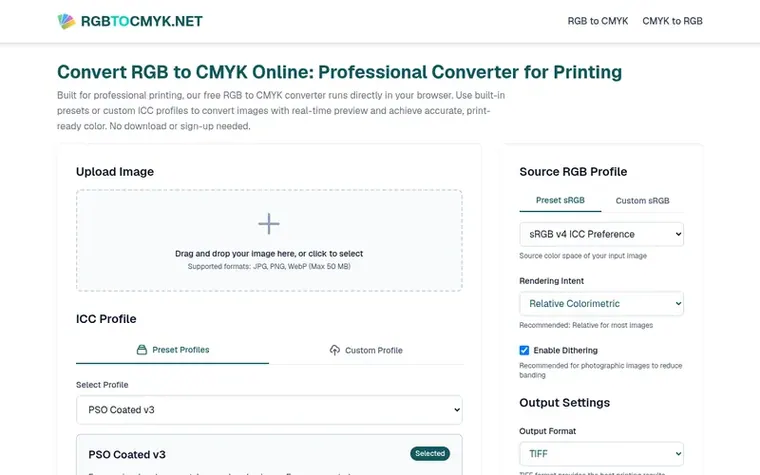
A free online RGB to CMYK converter for professional printing that runs in your browser with real-time preview and ICC profile support.
The story so far
Homepage of RGB to CMYK Converter
RGB to CMYK Converter is a browser-based tool designed for professional printing applications. It converts images from RGB color space used by digital displays to CMYK color space used for printing. The tool uses industry-standard color conversion technology matching professional software like Photoshop and GIMP.
The converter includes professional-grade features such as built-in ICC profiles, support for custom profile uploads, multiple rendering intents, black point compensation, optional dithering for smooth gradients, and real-time before-and-after preview. It supports JPG, PNG, and WebP input formats and outputs in TIFF, JPEG, or PNG formats.
No download, installation, or sign-up is required. All uploaded files are automatically deleted after download or within 10 minutes of inactivity, with privacy protection built-in.
Typeset features
Real-time preview and before/after comparison
Built-in ICC profiles with custom profile upload support
Professional rendering intents (Perceptual, Relative Colorimetric, Saturation, Absolute Colorimetric)
Black Point Compensation built-in
Optional dithering for smooth gradients
Multiple output formats (TIFF, JPEG, PNG)
Support for sRGB source profiles
No registration or sign-up required
Automatic file deletion after download or 10 minutes
RGB to CMYK Converter is a tool that transforms colors from RGB color space used for digital displays to CMYK color space used for printing. It uses professional color management technology to ensure accurate color conversion for print production. Users can preview results with real-time soft proof, choose correct profiles for specific printers and paper, apply optimizations like Black Point Compensation and Dithering, and catch color shifts before sending files to print.
Why change RGB to CMYK for printing?
RGB is for screens using additive color mixing that creates vibrant hues, while CMYK is for printing using subtractive color mixing with a more limited range. Many bright colors visible on RGB screens cannot be reproduced with CMYK inks. Automatic conversion by printer software is uncontrolled and produces unpredictable colors. Converting RGB to CMYK yourself bridges the gap between screen and ink, giving you control over the final outcome.
How accurate is the RGB to CMYK conversion result?
The converter uses industry-standard color management algorithms that match professional software like Photoshop, GIMP, and Ghostscript. The underlying algorithms are identical to professional software, making conversion results accurate and consistent with professional-grade tools.
What is a Source RGB Profile?
A Source RGB Profile, also called Source Color Space, is a color dictionary that defines the color range used when editing images and precisely defines what each RGB value represents in visible colors. For example, the same RGB value represents a wider red in Adobe RGB than in sRGB. Choosing the correct profile ensures accurate color interpretation during conversion.
Is my privacy protected when translating RGB to CMYK?
Yes, all uploaded images can only be downloaded by you. Files are immediately deleted when you click Download or Back to Start, or automatically deleted within 10 minutes if no action is taken. No one can access your files.
Leave a review for RGB to CMYK Converter
No review of RGB to CMYK Converter set in type yet. Set the first.

 Shrinkpad
 Threads Video Downloader
 FormatDrop
 Suno Downloader