Can I convert JSON to CSV for free?
Yes, the JSON to CSV converter is 100% free to use with no hidden fees, subscriptions, or file size paywalls. You can convert unlimited files and rows with complete client-side security.

File converters
Free online tool to convert JSON to CSV with privacy, nested data flattening, and interactive preview
Ahrefs Domain Rating set in type 25 Oct 2026, reset 25 Oct 2026.
| Metric | Value |
|---|---|
| Domain Rating | 2 no change since last check |
| Trust Flow | 0 no change since last check |
| Citation Flow | 17 no change since last check |
| Referring domains | 3 no change since last check |
| External backlinks | 8 no change since last check |
Ahrefs Domain Rating set in type 25 Oct 2026, reset 25 Oct 2026. Majestic set 25 Oct 2026, reset 25 Oct 2026. Link data typeset by Majestic. Trust Flow, Citation Flow and Topical Trust Flow are trademarks of Majestic-12 Ltd.
| Domain age | 1 month |
|---|---|
| Registered | |
| Expires | |
| Registrar | Spaceship, Inc. |
| DNSSEC | Not signed |
A free, client-side JSON to CSV converter with table preview, nested object flattening, custom delimiters, and syntax highlighting.
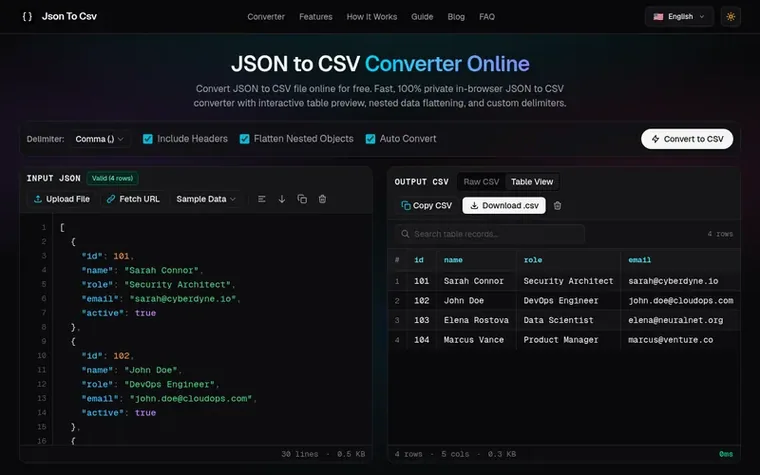
JSON to CSV Converter is a free web utility that transforms JSON data into clean, spreadsheet-ready CSV files entirely in your browser. It features an interactive table preview with search and pagination, automatic flattening of nested objects using dot notation, support for multiple delimiters (comma, semicolon, tab, pipe), and syntax-highlighted code editors. All conversion happens locally without uploading data to any server, ensuring complete privacy and security.
Pricing model: Free
No cost, unlimited conversions
Yes, the JSON to CSV converter is 100% free to use with no hidden fees, subscriptions, or file size paywalls. You can convert unlimited files and rows with complete client-side security.
This converter runs entirely in your browser, so your file never travels to a server. That is the safest possible setup. Be cautious with tools that require uploading sensitive data to an unknown server.
Flattening means rewriting nested data so nothing is nested anymore. Objects inside objects become dot-notation columns like customer.city, and every value sits at the top level. The converter flattens automatically because a CSV cell cannot hold nested data.
To convert JSON to CSV using our free online converter: Paste your JSON data into the left input editor or upload a .json file. Choose your formatting options (delimiter and nested object flattening). Click "Download .csv" or "Copy CSV" to export your converted spreadsheet file. The conversion happens instantly in your browser with zero latency.
You can convert a JSON file to CSV by dragging and dropping your .json file directly into the input box on this page, or clicking the "Upload File" button to select it from your computer. Our in-browser converter will instantly parse the file contents and generate a downloadable .csv file without uploading your document to any server.
No review of JSON to CSV Converter set in type yet. Set the first.
Reviews are free to set. None are paid for. Read the proofs
Readers' notes · Reprints · Share the page · Your company in print? Claim it · Report a misprint
JSON to CSV Converter has a free listing. The owner can unlock the full profile with a paid launch for $5:
 Shrinkpad
Native macOS app for batch compressing images and videos with complete privacy
 RGB to CMYK Converter
Professional online tool for converting RGB images to CMYK color space for printing
 Threads Video Downloader
Free tool to download Threads videos in HD without watermark
 FormatDrop
Free browser-based file converter for images, audio, video, and documents
Can we set one analytics cookie to count which pages readers flip to? Nothing is set unless you say yes. Privacy