Is the HEIC to PDF converter completely free?
Yes, the service is completely free with no registration required and no usage limits.

File converters
Free online converter for HEIC images to PDF, JPG, and PNG formats
Ahrefs Domain Rating set in type 25 Oct 2026, reset 25 Oct 2026.
| Metric | Value |
|---|---|
| Domain Rating | 11 no change since last check |
| Trust Flow | 6 no change since last check |
| Citation Flow | 27 no change since last check |
| Referring domains | 35 no change since last check |
| External backlinks | 1,091 no change since last check |
Ahrefs Domain Rating set in type 25 Oct 2026, reset 25 Oct 2026. Lead topic: Society/People (6). Majestic set 25 Oct 2026, reset 25 Oct 2026. Link data typeset by Majestic. Trust Flow, Citation Flow and Topical Trust Flow are trademarks of Majestic-12 Ltd.
| Domain age | 1 year |
|---|---|
| Registered | |
| Expires | |
| Registrar | Spaceship, Inc. |
| DNSSEC | Not signed |
A browser-based tool that converts HEIC and HEIF images to PDF, JPG, or PNG with local processing and no sign-up required.
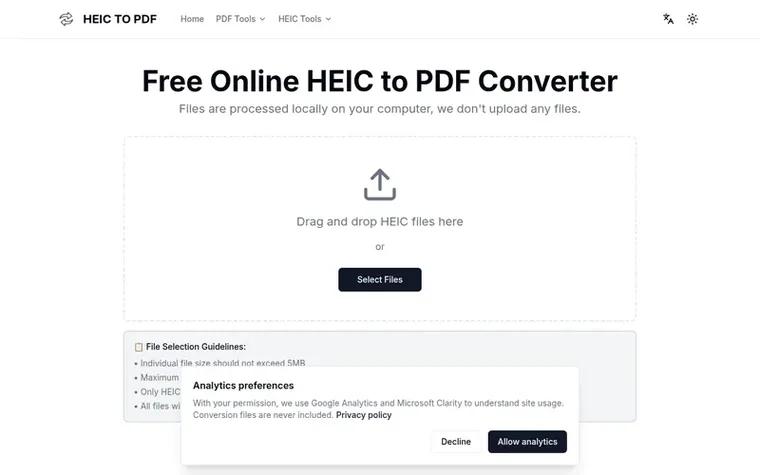
HeicToPDF is a free online converter that transforms HEIC and HEIF image files into PDF, JPG, or PNG formats directly in your web browser. All file processing occurs locally on your computer, ensuring your images never leave your device.
The tool supports batch conversion of up to 10 files at once, with each file limited to 5MB. It automatically generates previews of your images so you can confirm content before conversion, and offers two modes: merge all images into a single PDF or generate individual PDF files for each image.
No registration, login, or hidden fees are required. The service works on any modern web browser with JavaScript enabled, including Chrome, Firefox, and Safari, making it accessible across different devices and operating systems.
Pricing model: Free
Yes, the service is completely free with no registration required and no usage limits.
Yes, it is absolutely safe. All file processing is done locally in your browser, and servers never touch your files.
HEIC is an efficient image format used by Apple devices to compress photos and save storage space. HEIC files work on iPhone 7 and later models running iOS 11 or higher, but may not display directly on other devices, so converting to PDF ensures compatibility.
HEIC files cannot be displayed directly in browsers, so previews are generated to let you confirm file content before performing the PDF conversion.
HEIC and JPG each have advantages and disadvantages depending on use case. HEIC is more efficient, provides richer details at the same file size, and can store burst photos and Live Photos, but requires devices that support HEVC to view.
No review of HeicToPDF set in type yet. Set the first.
Reviews are free to set. None are paid for. Read the proofs
Readers' notes · Reprints · Share the page · Your company in print? Claim it · Report a misprint
HeicToPDF has a free listing. The owner can unlock the full profile with a paid launch for $5:
 Shrinkpad
Native macOS app for batch compressing images and videos with complete privacy
 RGB to CMYK Converter
Professional online tool for converting RGB images to CMYK color space for printing
 Threads Video Downloader
Free tool to download Threads videos in HD without watermark
 FormatDrop
Free browser-based file converter for images, audio, video, and documents
Can we set one analytics cookie to count which pages readers flip to? Nothing is set unless you say yes. Privacy