How do I convert a doc to MD?
Upload a Word .doc or .docx file or another supported document, then preview the Markdown and copy or download the .md file. No installation is required.
File converters
Free document to Markdown converter with no signup
Ahrefs Domain Rating set in type 25 Oct 2026, reset 25 Oct 2026.
| Metric | Value |
|---|---|
| Domain Rating | 1 no change since last check |
| Trust Flow | 4 no change since last check |
| Citation Flow | 25 no change since last check |
| Referring domains | 18 no change since last check |
| External backlinks | 73 no change since last check |
Ahrefs Domain Rating set in type 25 Oct 2026, reset 25 Oct 2026. Lead topic: Computers/News and Media (4). Majestic set 25 Oct 2026, reset 25 Oct 2026. Link data typeset by Majestic. Trust Flow, Citation Flow and Topical Trust Flow are trademarks of Majestic-12 Ltd.
| Domain age | 1 year |
|---|---|
| Registered | |
| Expires | |
| Registrar | Spaceship, Inc. |
| DNSSEC | Not signed |
Upload Word, PDF, or other documents and convert them to Markdown. Tables and images are preserved. Free for 3 daily conversions without signup.
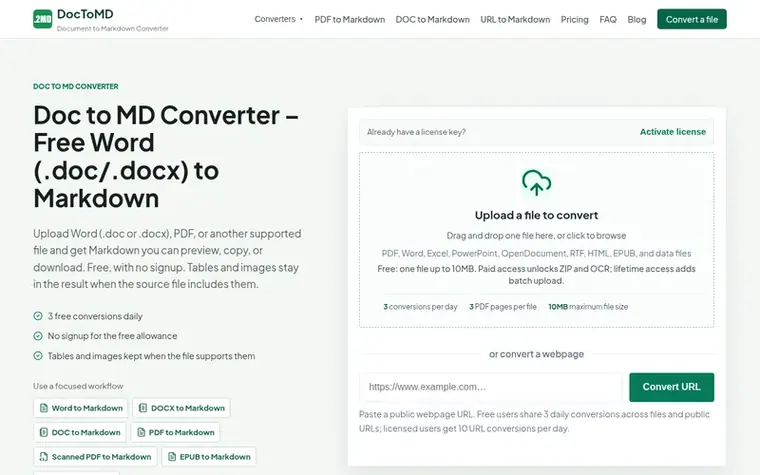
DocToMD converts documents to Markdown format. Upload Word (.doc/.docx), PDF, PowerPoint, Excel, HTML, EPUB, CSV, JSON files or paste a public webpage URL. The converter preserves tables, headings, lists, links, and images when the source file supports them. Free users get 3 conversions daily with files up to 10MB and PDFs up to 3 pages, requiring no signup or account. Paid plans offer higher daily limits, larger file sizes, and additional features like OCR for scanned PDFs and batch uploads. Files are processed temporarily and deleted after conversion.
Pricing model: Freemium
Free: 3 conversions daily. 7-Day Pass: $6.99 (20 conversions/day). Lifetime Access: $49 (launch price $39 for first 50 buyers, 50 conversions/day).
Upload a Word .doc or .docx file or another supported document, then preview the Markdown and copy or download the .md file. No installation is required.
Yes, you get 3 free conversions every day with no signup. A 7-day pass ($6.99) includes 20 conversions per day. Lifetime access is $49, with a launch price of $39 for the first 50 buyers, and includes 50 conversions per day.
Simple tables, headings, lists, links, and images are kept when the source file exposes them. Complex layouts, merged cells, and scanned pages may need manual cleanup.
You can convert DOC, DOCX, PDF, PowerPoint, Excel, HTML, EPUB, CSV, JSON, and public webpage URLs. Scanned PDFs use the paid OCR workflow, and ZIP archives require a license.
No. Free conversions work without an account. Uploaded files are processed temporarily and removed after processing.
No review of DocToMD set in type yet. Set the first.
Reviews are free to set. None are paid for. Read the proofs
Readers' notes · Reprints · Share the page · Your company in print? Claim it · Report a misprint
DocToMD has a free listing. The owner can unlock the full profile with a paid launch for $5:
 Shrinkpad
Native macOS app for batch compressing images and videos with complete privacy
 RGB to CMYK Converter
Professional online tool for converting RGB images to CMYK color space for printing
 Threads Video Downloader
Free tool to download Threads videos in HD without watermark
 FormatDrop
Free browser-based file converter for images, audio, video, and documents
Can we set one analytics cookie to count which pages readers flip to? Nothing is set unless you say yes. Privacy