Ahrefs Domain Rating set in type 17 Nov 2026, reset 13 Nov 2026.
A free Pomodoro timer for iPhone and Apple Watch that grows a flower while you work, with app blocking via Screen Time and no account required.
The story so far
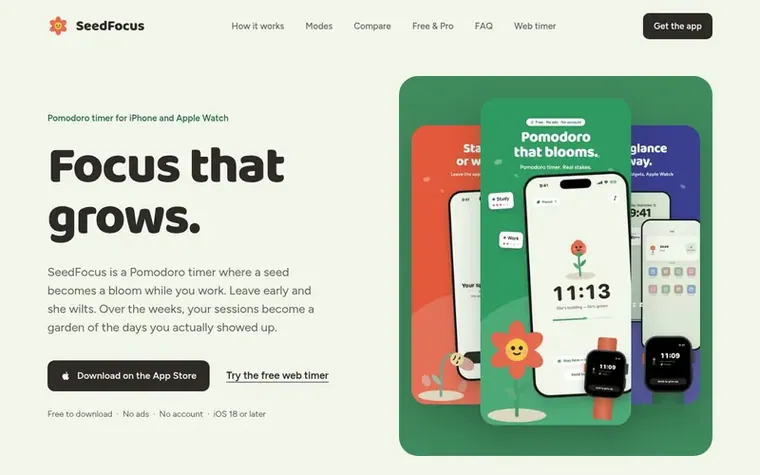
Homepage of SeedFocus
SeedFocus is a Pomodoro timer for iPhone, iPad and Apple Watch where you plant a seed at the start of a focus session and watch it grow into a flower as you work. The app offers three modes: Greenhouse (strict, wilts if you leave), Lattice (uses Screen Time app blocking), and Open Air (gentle tracking only). Sessions are 25 minutes by default but adjustable from 5 to 120 minutes, with customizable rest periods and cycles.
Your completed sessions are planted in a garden with notes, creating a visual record of your focus over time. The app includes widgets, lock screen Live Activity display, Apple Watch app with Digital Crown controls and complications, and tag-based organization. All core features are free with no ads and no sign-up required.
SeedFocus Pro is an optional in-app upgrade that adds a full calendar and planner, past journal days, stats charts by tag and best hours, every ambient sound, custom tags, alternate app icons and iCloud sync. The app requires iOS 18 or later.
Typeset features
Three focus modes: Greenhouse (wilts if you leave), Lattice (app blocking), Open Air (tracking only)
App blocking with Apple's Screen Time
Full Apple Watch app with Digital Crown controls and complications
Lock screen Live Activity and Dynamic Island display
Customizable focus sessions from 5 to 120 minutes
Garden of completed sessions with notes
Tag-based organization for focus types
Widgets and Control Center integration
No sign-up required, optional iCloud sync with Pro
Pricing
Pricing model: Freemium
Free tier includes timer, all three focus modes, app blocking, Apple Watch app, widgets, garden, badges and today's journal with no ads and no account. SeedFocus Pro is an optional in-app upgrade.
Want to see what SeedFocus does next? Follow them for milestones, new products and stories by email.
SeedFocus metrics
Set in type for seedfocus.touch4feel.com: Ahrefs Domain Rating and Majestic link data, with the change since the last edition.
Metric
Value
Domain Rating
15● no change since last check
Trust Flow
0● no change since last check
Citation Flow
13● no change since last check
Referring domains
4● no change since last check
External backlinks
7● no change since last check
Ahrefs Domain Rating set in type 17 Nov 2026, reset 13 Nov 2026. Majestic set 13 Nov 2026, reset 13 Nov 2026. Link data typeset by Majestic. Trust Flow, Citation Flow and Topical Trust Flow are trademarks of Majestic-12 Ltd.
SeedFocus domain colophon
Read the colophon
From the registry's public RDAP record, checked 16 Nov 2026, 16:10 UTC.
Measured after SeedFocus went live on Zivaro Launch on 13 November 2026.
Domain Rating (Ahrefs)
15● no change since launch
15 at launch (13 Nov 2026), 15 on 17 Nov 2026
Trust Flow (Majestic)
0
First measured 13 Nov 2026
Referring domains (Majestic)
4
First measured 13 Nov 2026
Day 4 since launch. Next receipt: day 30, 13 Dec 2026. These are measurements, not proof of cause: many things move these numbers. Figures we have not measured are left out.
SeedFocus is free to download with the timer, all three focus modes, Apple Watch app, garden, badges, widgets and today's journal included with no ads and no account. SeedFocus Pro is an optional in-app upgrade that adds the full calendar and planner, past journal days, stats charts, every sound, custom tags, the Sunflower, alternate icons and iCloud sync.
Can SeedFocus block apps like Instagram or TikTok while I study?
Yes. In Lattice mode you pick the apps to put away and SeedFocus blocks them with Apple's Screen Time until your session ends. Blocking is free.
What happens if I leave the app during a session?
It depends on the mode. In Greenhouse mode leaving the app wilts your flower. In Lattice mode nothing wilts because the blocked apps are the stake. In Open Air nothing happens and SeedFocus just records your focus.
Does SeedFocus work on Apple Watch?
Yes. The watch app shows the flower, countdown and tag, lets you start a session and set minutes with the Digital Crown, pause, change the tag or skip a rest, and has watch-face complications.
How is SeedFocus different from Forest?
Both grow a plant while you focus. SeedFocus lets you choose how firm it is with strict, Screen Time blocking, or tracking only options, has a full Apple Watch app, Live Activity, a planner and an hourly focus heat map, and its core is free with no account.
Leave a review for SeedFocus
No review of SeedFocus set in type yet. Set the first.

 Dawny
 PeekHarbor
 itsTypo
 IdeaOracle