Ahrefs Domain Rating set in type 17 Nov 2026, reset 16 Nov 2026.
A native macOS app that lets you preview links in a floating window and save bookmarks to the bar under the MacBook notch.
The story so far
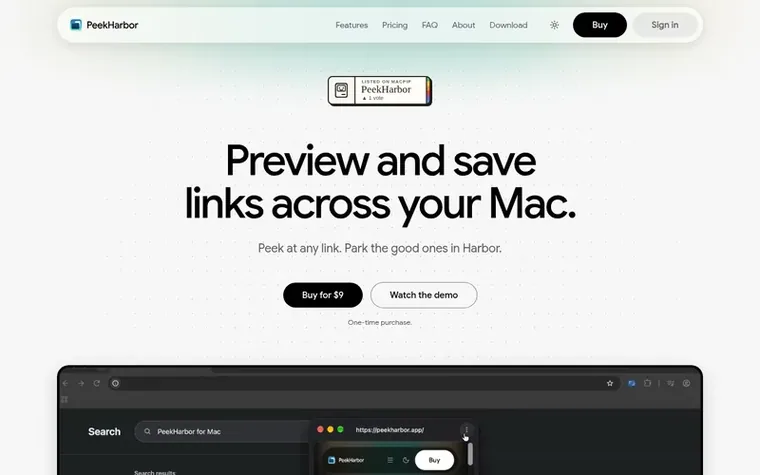
Homepage of PeekHarbor
PeekHarbor is a native macOS app designed for link previews and bookmarks. When you encounter a link, you can preview it in a compact floating window without opening a new tab or leaving your current app. Bookmarks can be saved into folders, reordered, and accessed from the bar under the MacBook notch using keyboard shortcuts or the menu bar icon.
The app works with macOS Accessibility to read links and selected text. You can sync bookmarks with iCloud if you choose to enable it. PeekHarbor requires macOS 14 Sonoma or later and Apple silicon, with no subscription—just a one-time license starting at $9 with lifetime updates.
Typeset features
Preview links in a floating window without opening a new tab
Resize and move the preview window
Save bookmarks into folders and reorder them
Access bookmarks from the bar under the MacBook notch
Search selected text via Google
Sync bookmarks with iCloud
Customizable keyboard shortcuts
No Dock icon, menu bar only
Works offline for 14 days after last license check
Pricing
Pricing model: Paid
$9 per license key (one-time). Volume pricing: 3–4 keys at $8 each ($24 total), 5–8 keys at $7 each ($35 total), 9 keys at $60 total ($6.67 per key), 10–16 keys at $6 each, 17–19 keys at $100 total, 20+ keys at $5 each. Each purchase is priced independently; you never pay more than the next tier's p
Want to see what PeekHarbor does next? Follow them for milestones, new products and stories by email.
PeekHarbor metrics
Set in type for peekharbor.app: Ahrefs Domain Rating and Majestic link data, with the change since the last edition.
Metric
Value
Domain Rating
0● no change since last check
Trust Flow
0● no change since last check
Citation Flow
0● no change since last check
Referring domains
0● no change since last check
External backlinks
0● no change since last check
Ahrefs Domain Rating set in type 17 Nov 2026, reset 16 Nov 2026. Majestic set 16 Nov 2026, reset 16 Nov 2026. Link data typeset by Majestic. Trust Flow, Citation Flow and Topical Trust Flow are trademarks of Majestic-12 Ltd.
PeekHarbor domain colophon
Read the colophon
From the registry's public RDAP record, checked 17 Nov 2026, 17:28 UTC.
Measured after PeekHarbor went live on Zivaro Launch on 16 November 2026.
Domain Rating (Ahrefs)
0● no change since launch
0 at launch (16 Nov 2026), 0 on 17 Nov 2026
Trust Flow (Majestic)
0
First measured 16 Nov 2026
Referring domains (Majestic)
0
First measured 16 Nov 2026
Day 1 since launch. Next receipt: day 30, 16 Dec 2026. These are measurements, not proof of cause: many things move these numbers. Figures we have not measured are left out.
PeekHarbor is a macOS app for previewing links, searching selected text, and saving bookmarks. On a MacBook with a notch, Harbor expands from the notch and can be opened or closed with ⌥⌘B or by clicking the menu bar icon. On a MacBook with a built-in notch, you can enable Click notch to toggle Harbor in Settings.
What Mac do I need for PeekHarbor?
PeekHarbor requires macOS 14 Sonoma or later and a Mac with Apple silicon. You must grant Accessibility permission for Preview and the related shortcuts.
How much does PeekHarbor cost?
One license key costs $9, paid once, with lifetime updates. Volume discounts are available; see Pricing for details.
Is there a free trial of PeekHarbor?
No, PeekHarbor has no free trial.
Nothing happens when I ⌘ + right-click. Why?
Check that your key is active in Settings → License . Then open Settings → General and check that Enable link preview is on and Accessibility says Access granted . Use the Preview shortcut listed there. If PeekHarbor finds nothing to open, your usual right-click goes through.
Leave a review for PeekHarbor
No review of PeekHarbor set in type yet. Set the first.
 Dawny
 itsTypo
 IdeaOracle
 SeedFocus