Ahrefs Domain Rating set in type 18 Nov 2026, reset 17 Nov 2026.
A free iPhone to-do app that resets your daily task list every night at 3 AM, requiring you to consciously reprioritize each morning instead of carrying over
The story so far
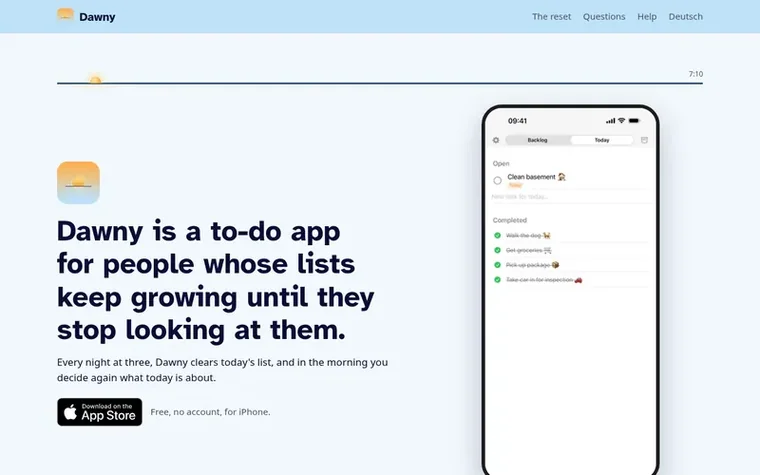
Homepage of Dawny
Dawny is a free iPhone to-do app designed for people whose task lists grow too large to manage. Every night at 3 AM, Dawny clears your Today list, archiving completed tasks and moving unfinished ones to storage. Each morning, you actively choose which tasks matter for that day by moving them from the Backlog to Today.
The app organizes tasks into three sections: the Backlog holds upcoming tasks sorted by time horizons (Quick, Next couple of days, Next couple of weeks, Next couple of months, Someday), the Today list contains only what you committed to for the current day, and the Archive stores completed and abandoned tasks sorted by date. Tasks you repeatedly leave behind are automatically archived after one to seven days depending on your settings.
Dawny integrates with Apple Reminders and Calendar to sync your Today list across devices and also offers widgets, Siri voice commands, iCloud sync, and customizable categories. The app contains no ads, requires no account, and collects no data. It is built by one person in Karlsruhe with open-source code available on GitHub.
Typeset features
Daily reset at 3 AM that clears your Today list and archives unfinished tasks
Integration with Apple Reminders and Calendar to sync Today's tasks across devices
Create custom task categories with custom names and symbols
Recurring categories that return tasks to Backlog each night regardless of completion
Widgets for checking off tasks from your iPhone home screen without opening the app
Siri voice commands and Shortcuts integration to add tasks by voice
Want to see what Dawny does next? Follow them for milestones, new products and stories by email.
Dawny metrics
Set in type for dawnyapp.com: Ahrefs Domain Rating and Majestic link data, with the change since the last edition.
Metric
Value
Domain Rating
0● no change since last check
Trust Flow
0● no change since last check
Citation Flow
10● no change since last check
Referring domains
1● no change since last check
External backlinks
1● no change since last check
Ahrefs Domain Rating set in type 18 Nov 2026, reset 17 Nov 2026. Majestic set 17 Nov 2026, reset 17 Nov 2026. Link data typeset by Majestic. Trust Flow, Citation Flow and Topical Trust Flow are trademarks of Majestic-12 Ltd.
Dawny domain colophon
Read the colophon
From the registry's public RDAP record, checked 17 Nov 2026, 00:50 UTC.
Measured after Dawny went live on Zivaro Launch on 17 November 2026.
Domain Rating (Ahrefs)
0● no change since launch
0 at launch (17 Nov 2026), 0 on 18 Nov 2026
Trust Flow (Majestic)
0
First measured 17 Nov 2026
Referring domains (Majestic)
1
First measured 17 Nov 2026
Day 1 since launch. Next receipt: day 30, 17 Dec 2026. These are measurements, not proof of cause: many things move these numbers. Figures we have not measured are left out.
Yes, archived tasks are filed but not deleted. The archive is sorted by date and searchable. You can swipe a task to the right to bring it back to the Backlog or straight to Today. Only tasks you delete yourself are permanently removed.
Does Dawny work offline or require an account?
No, you download the app and start using it immediately. Your tasks live on your iPhone and, if you enable iCloud sync, in your own iCloud account. There is no company server and the app contains no analytics, crash reporting or trackers.
What exactly happens at three in the morning?
Dawny ends the day and clears today's list: what was done is in the archive under “Completed”, what was not is under “Archived”, and recurring tasks go back to the Backlog. The app does not need to be open for that. The time can be changed freely in Settings.
Why three and not midnight?
Because a day does not end at twelve but when you go to sleep, and whoever checks something off at half past midnight wants to see it in yesterday's Today, not in today's morning.
Why do unfinished tasks go to the archive instead of tomorrow's list?
Because a list that only grows stops being read at some point. A place on today's list is a promise for this one day. Once the day is over, Dawny puts the task away instead of showing it to you again tomorrow with a red dot. Whatever matters to you, you bring back the next morning with one swipe. Whatever you do not bring back was apparently not that important.
Leave a review for Dawny
No review of Dawny set in type yet. Set the first.

 PeekHarbor
 itsTypo
 IdeaOracle
 SeedFocus