Ahrefs Domain Rating set in type 9 Nov 2026, reset 8 Nov 2026.
A collection of practical browser-based utilities for editing PDFs, converting images, creating passport photos, preparing documents for printing, and
The story so far
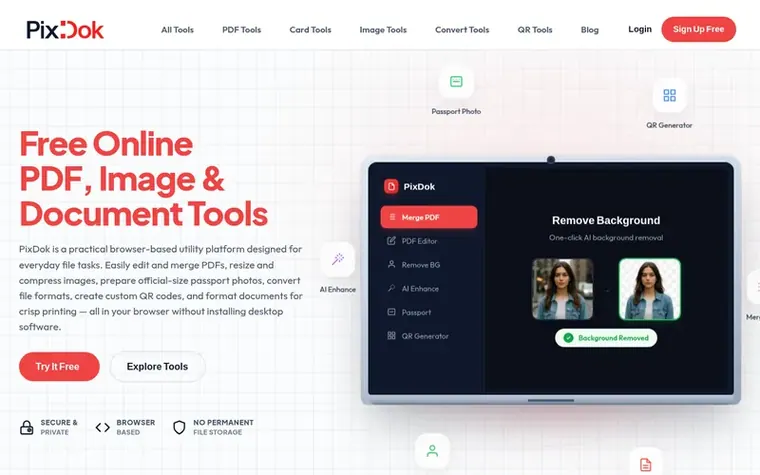
Homepage of PixDok
PixDok is a free, browser-based platform providing practical document and image tools for everyday users, students, job applicants, and small business operators. The platform offers utilities for PDF editing, merging, splitting, and compression; image resizing, cropping, and background removal; document preparation and ID card formatting for printing; file format conversions; and QR code generation. All tools run directly in the web browser without requiring software downloads, and most core tools process files locally on the user's device. For advanced features like AI background removal, files are processed temporarily on secure servers and automatically deleted within 30 minutes. PixDok is designed for individuals preparing documents for online applications, CSC operators, cyber cafes, and print shops, with particular support for Indian government identity document formatting like Aadhaar, PAN, and Voter ID cards.
Typeset features
PDF editing with text, shapes, signatures and annotations
Merge and split PDF files
PDF compression and password protection
AI background removal for images
Passport photo generation in multiple formats
Image cropping and resizing
HEIC to JPG conversion for iPhone photos
QR code generation with custom logos and colors
Government ID card formatting to PVC standard sizes
PDF OCR for text extraction from scanned documents
Want to see what PixDok does next? Follow them for milestones, new products and stories by email.
PixDok metrics
Set in type for pixdok.com: Ahrefs Domain Rating and Majestic link data, with the change since the last edition.
Metric
Value
Domain Rating
5● no change since last check
Trust Flow
3● no change since last check
Citation Flow
12● no change since last check
Referring domains
6● no change since last check
External backlinks
236● no change since last check
Ahrefs Domain Rating set in type 9 Nov 2026, reset 8 Nov 2026. Lead topic: Regional/Asia (3). Majestic set 7 Nov 2026, reset 7 Nov 2026. Link data typeset by Majestic. Trust Flow, Citation Flow and Topical Trust Flow are trademarks of Majestic-12 Ltd.
PixDok domain colophon
Read the colophon
From the registry's public RDAP record, checked 7 Nov 2026, 23:50 UTC.
Measured after PixDok went live on Zivaro Launch on 7 November 2026.
Domain Rating (Ahrefs)
5
First measured 8 Nov 2026
Trust Flow (Majestic)
3
First measured 7 Nov 2026
Referring domains (Majestic)
6
First measured 7 Nov 2026
Day 0 since launch. Next receipt: day 30, 7 Dec 2026. These are measurements, not proof of cause: many things move these numbers. Figures we have not measured are left out.
PixDok is a web-based collection of practical utilities for working with PDFs, images, documents, and QR codes, designed to make routine file tasks such as editing, resizing, compressing, converting, and formatting documents for print fast and simple directly inside your browser.
Are PixDok tools available online, and do I need to install software?
Yes, all PixDok tools are available online and run directly in your web browser. You do not need to download or install desktop software, smartphone apps, or browser extensions—simply open the website, choose a tool, and complete your task.
What happens to uploaded files, and how is privacy handled?
PixDok treats user privacy with high priority. Client-side tools process files directly on your device inside your browser. For utilities requiring server assistance, files are transmitted over encrypted HTTPS connections, processed temporarily, and automatically deleted from servers within 30 minutes. Personal documents are not permanently stored or shared.
Is PixDok affiliated with any government department or authority?
No. PixDok is an independent private utility platform and is not affiliated with, authorized by, endorsed by, or officially connected with UIDAI (Aadhaar), CSC, the Election Commission of India, the Income Tax Department, or any government department. It does not issue, verify, or alter official government identity cards.
Can I use PixDok to prepare files for online job applications and visa portals?
Yes. Many users rely on PixDok to prepare files for online job applications, university admissions, visa portals, and government forms. You can resize photos to exact dimensions, compress PDF and image sizes to meet strict portal limits, and convert photos to PDF format.
Leave a review for PixDok
No review of PixDok set in type yet. Set the first.

 WeaveAI Tools
 KovaPDF
 PdfConvertor
 PDFtada