Is PDFtada really free?
Yes, every tool is free to use with no daily limit, no sign-up requirement and no paid plan hiding features.

PDF tools
Free PDF tools that run in your browser with no uploads, no sign-up, no watermarks
Ahrefs Domain Rating set in type 8 Nov 2026, reset 7 Nov 2026.
PDFtada offers free PDF tools including merge, compress, convert, edit and sign functions that process files directly in your browser without uploading them to
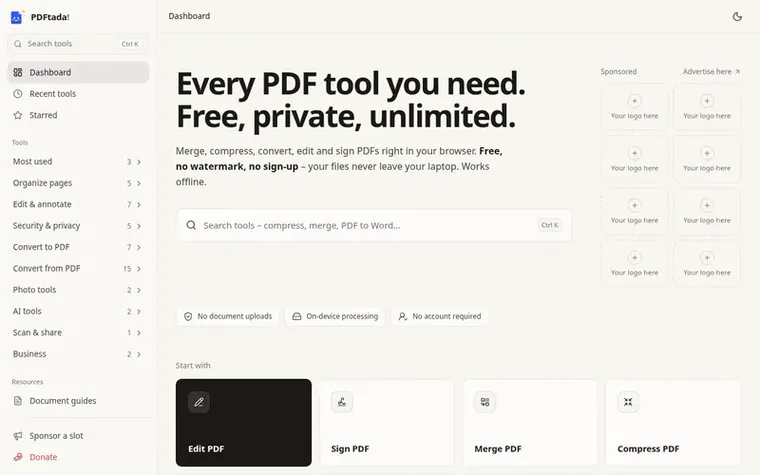
PDFtada is a collection of free PDF tools that process documents entirely in your browser, keeping files on your device without uploading them to servers. The platform includes 49 tools for merging, compressing, converting, editing and signing PDFs, with additional capabilities for organizing pages, adding security, extracting content, and handling photos and scans.
The service requires no account creation, adds no watermarks to output files, and imposes no daily usage limits. It works across all modern browsers on phones, tablets and laptops, and includes offline functionality once tools are cached in your browser.
PDFtada prioritizes privacy by design, processing documents locally on your device where you can verify nothing is uploaded. The platform is built around making everyday document tasks straightforward without requiring subscriptions or account creation.
Pricing model: Free
Want to see what PDFtada does next? Follow them for milestones, new products and stories by email.
| Metric | Value |
|---|---|
| Domain Rating | 1 no change since last check |
| Trust Flow | 0 no change since last check |
| Citation Flow | 13 no change since last check |
| Referring domains | 1 no change since last check |
| External backlinks | 1 no change since last check |
Ahrefs Domain Rating set in type 8 Nov 2026, reset 7 Nov 2026. Majestic set 7 Nov 2026, reset 7 Nov 2026. Link data typeset by Majestic. Trust Flow, Citation Flow and Topical Trust Flow are trademarks of Majestic-12 Ltd.
| Domain age | 12 days |
|---|---|
| Registered | |
| Expires | |
| Registrar | GoDaddy.com, LLC |
| DNSSEC | Not signed |
Measured after PDFtada went live on Zivaro Launch on 7 November 2026.
Day 0 since launch. Next receipt: day 30, 7 Dec 2026. These are measurements, not proof of cause: many things move these numbers. Figures we have not measured are left out.
Free tips from Zivaro Launch for getting ready, launch day, the week after and what to do next.
Yes, every tool is free to use with no daily limit, no sign-up requirement and no paid plan hiding features.
No. Your browser does all the work on your own device, so the file never leaves your device and is safe for sensitive documents like IDs, contracts and bank statements.
No. PDFtada works in Chrome, Safari, Edge and Firefox on Android phones, iPhones, tablets and laptops. You can optionally install it as an app by tapping Install app at the bottom of any page.
There is no fixed limit. Very large files depend on how much memory your device has, so a laptop handles bigger files than an older phone.
No. Files you create, convert or edit here come out clean, with no PDFtada logo or text added.
No review of PDFtada set in type yet. Set the first.
Reviews are free to set. None are paid for. Read the proofs
Readers' notes · Reprints · Share the page · Your company in print? Claim it · Report a misprint
PDFtada has a free listing. The owner can unlock the full profile with a paid launch for $5:
 WeaveAI Tools
Fast, private tools for documents, images and code that run in your browser
 PixDok
Free browser-based tools for PDF editing, image processing, document preparation, and QR code generation
 KovaPDF
Online PDF toolkit for editing, converting, compressing and reading PDFs with OCR
 PdfConvertor
60+ free online PDF tools for converting, editing, compressing, and securing documents