Ahrefs Domain Rating set in type 8 Nov 2026, reset 7 Nov 2026.
Browser-based PDF tools for editing, converting, compressing, signing and reading documents in 27 languages, with OCR support for scanned files.
The story so far
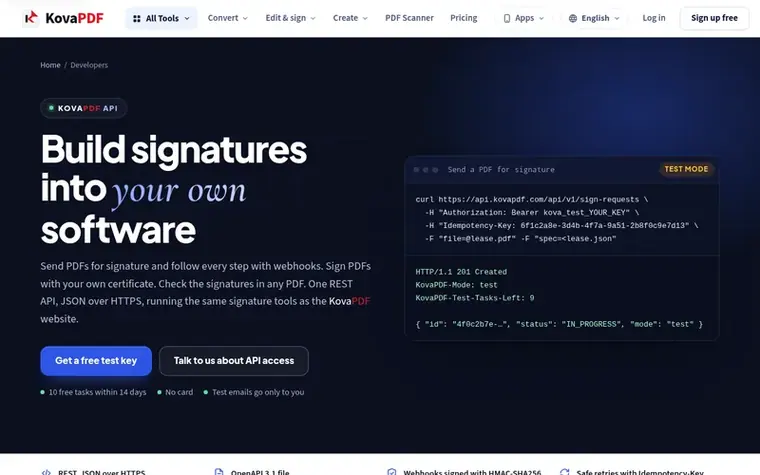
Homepage of KovaPDF
KovaPDF is a set of online PDF tools that run entirely in your browser. You can edit, convert, compress, split, merge, sign and read PDFs without installing anything. The platform includes 50+ tools for document editing, format conversion, OCR text recognition in nine languages including Spanish, Portuguese, Arabic and Chinese, digital signatures with your own certificate, and signature request workflows with webhooks.
The service provides both free and paid plans. Free access includes all tools with usage limits, while Pro ($3.99/month) removes limits and adds unlimited signature requests, larger file sizes, priority support, and offline work in the Windows app. Team plans ($4.99/user, from 3-50 users) include everything in Pro plus team collaboration features. For organizations with 50+ people, custom Business pricing is available.
KovaPDF prioritizes privacy and security: 24 of its tools run entirely in the browser and never upload files, while others delete files immediately after processing. Signature documents are kept until completion and deleted 30 days later. The platform is available in 27 languages and works on desktop browsers, mobile browsers (except Translate PDF), and has Windows and mobile apps.
Typeset features
50+ PDF tools for editing, converting, compressing, splitting and merging
OCR text recognition in 9 languages including Spanish, Portuguese, Arabic and Chinese
Send PDFs for signature with webhooks for real-time notifications
24 tools that never upload files, run entirely in browser
Works on desktop, mobile browser and Windows app with offline support
Available in 27 languages
REST API with JSON over HTTPS and OpenAPI 3.1 documentation
Free test key with 10 tasks within 14 days for API development
Pricing
Pricing model: Freemium
Free: all tools with limited use, no account needed. Pro: $3.99/month (billed $47.88/year, save 43%) with unlimited use, unlimited signature requests, larger files, unlimited OCR, priority support. Team: $4.99/user per month (billed $59.88/year), 15% off each user after the first 15, from 3-50 users
Want to see what KovaPDF does next? Follow them for milestones, new products and stories by email.
KovaPDF metrics
Set in type for kovapdf.com: Ahrefs Domain Rating and Majestic link data, with the change since the last edition.
Metric
Value
Domain Rating
0● no change since last check
Trust Flow
5● no change since last check
Citation Flow
16● no change since last check
Referring domains
1● no change since last check
External backlinks
3● no change since last check
Ahrefs Domain Rating set in type 8 Nov 2026, reset 7 Nov 2026. Lead topic: Business (4). Majestic set 7 Nov 2026, reset 7 Nov 2026. Link data typeset by Majestic. Trust Flow, Citation Flow and Topical Trust Flow are trademarks of Majestic-12 Ltd.
KovaPDF domain colophon
Read the colophon
From the registry's public RDAP record, checked 7 Nov 2026, 13:50 UTC.
Measured after KovaPDF went live on Zivaro Launch on 7 November 2026.
Domain Rating (Ahrefs)
0
First measured 7 Nov 2026
Trust Flow (Majestic)
5
First measured 7 Nov 2026
Referring domains (Majestic)
1
First measured 7 Nov 2026
Day 0 since launch. Next receipt: day 30, 7 Dec 2026. These are measurements, not proof of cause: many things move these numbers. Figures we have not measured are left out.
With a free test key you can try all API features: send signature requests and follow them with webhooks, sign PDFs with your own certificate, and verify the signatures in PDFs. A test key runs 10 tasks within 14 days. Every signing email goes only to you, and every file is stamped TEST.
What counts as a task in the API?
One task is one signature request made, one verification, or one digital signing. Reading, listing, downloading and status calls are not tasks, and a call that fails is not counted.
Is KovaPDF free?
Yes. Every tool works without paying and without an account. Files can be up to 200 pages and 50 MB. Pro removes the limits.
How does KovaPDF process PDFs?
Your file stays on the server only for a short time while it is processed, then it is deleted over an encrypted connection. Some tools like Translate PDF work in your browser and never upload the file. Summarize PDF sends only the text to an AI service. Multi-step tools like SmartShrink keep the file for up to 30 minutes. Signature requests keep the document until finished and delete it 30 days later.
How does pricing work for API access?
Live API access is priced for how you will use it. Tell KovaPDF what you will build and roughly how many documents a month, and they send you a written offer with a monthly task allowance.
Leave a review for KovaPDF
No review of KovaPDF set in type yet. Set the first.
 WeaveAI Tools
 PixDok
 PdfConvertor
 PDFtada