What image formats are supported by PhotoPDF?
PhotoPDF supports all common image formats, including JPG, JPEG, PNG, BMP, and GIF files. You can convert mixed image formats into a single PDF or batch convert them effortlessly.

PDF tools · Hong Kong
Batch convert, merge, and index photos into professional PDF documents
Ahrefs Domain Rating set in type 12 Nov 2026, reset 12 Nov 2026.
A desktop tool for converting photos to PDF with three modes: batch conversion to individual files, merging multiple images into one PDF, and creating thumbnail
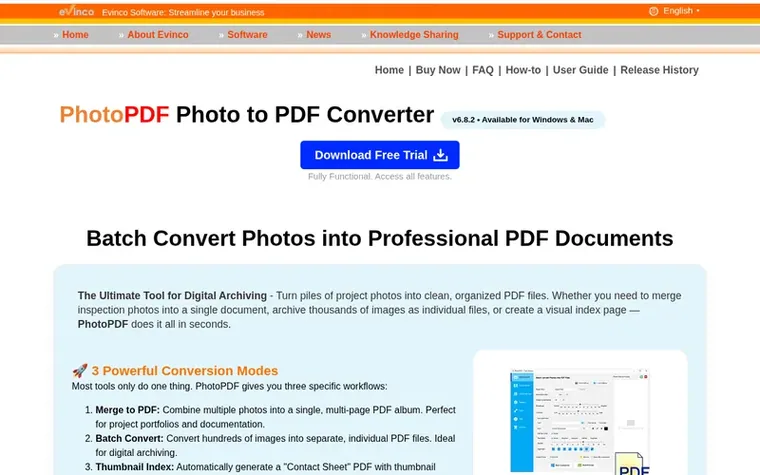
PhotoPDF is a desktop application for converting photos into PDF documents. It offers three conversion modes: Batch Convert to create individual PDF files from multiple images, Merge to combine photos into a single multi-page PDF, and Thumbnail Index to generate contact sheet PDFs with photo overviews.
The software provides extensive output control including customizable paper sizes (A3, A4, A5, Letter, or custom), orientation settings, resolution optimization, and metadata addition. Users can add watermarks to protect their work, and all processing occurs locally offline on the user's computer.
PhotoX supports all common image formats including JPG, JPEG, PNG, BMP, and GIF files, and can handle mixed formats in a single conversion. It is available for Windows and macOS platforms.
Pricing model: Paid
US$24.95 one-time purchase. Lifetime license. Free trial available with all 3 processing modes fully functional.
Want to see what PhotoPDF Photo to PDF Converter does next? Follow them for milestones, new products and stories by email.
| Metric | Value |
|---|---|
| Domain Rating | 27 no change since last check |
| Trust Flow | 40 no change since last check |
| Citation Flow | 37 no change since last check |
| Referring domains | 179 no change since last check |
| External backlinks | 3,968 no change since last check |
Ahrefs Domain Rating set in type 12 Nov 2026, reset 12 Nov 2026. Lead topic: Computers/Companies (40). Majestic set 12 Nov 2026, reset 12 Nov 2026. Link data typeset by Majestic. Trust Flow, Citation Flow and Topical Trust Flow are trademarks of Majestic-12 Ltd.
| Domain age | 17 years |
|---|---|
| Registered | |
| Expires | |
| Registrar | NameCheap, Inc. |
| DNSSEC | Not signed |
Free tips from Zivaro Launch for getting ready, launch day, the week after and what to do next.
PhotoPDF supports all common image formats, including JPG, JPEG, PNG, BMP, and GIF files. You can convert mixed image formats into a single PDF or batch convert them effortlessly.
Yes. PhotoPDF is a local Windows desktop software where all photo conversions, merging, and thumbnail index generation are processed completely offline on your computer, and your files are never uploaded to any cloud server.
The free trial version lets you test all 3 processing modes (Batch Convert, Merge, and Thumbnail Index) so you can evaluate its performance before purchasing a full license.
PhotoPDF supports Windows 11, 10, 8.1, 8, and 7, as well as macOS 10.12 or later.
You will get a set of license information of the software, technical support services and other related information of the software.
No review of PhotoPDF Photo to PDF Converter set in type yet. Set the first.
Reviews are free to set. None are paid for. Read the proofs
Readers' notes · Reprints · Share the page · Your company in print? Claim it · Report a misprint
PhotoPDF Photo to PDF Converter has a free listing. The owner can unlock the full profile with a paid launch for $5:
 PDFLE
Browser-based viewers and converters for documents, 3D models, images and ebooks
 PDF Measure
Measure PDF plans in your browser
 Docmint
Private PDF and image tools that run entirely in your browser
 BytesPDF
Merge, compress and edit PDFs in your browser without uploading