Is PDF Measure really free?
Yes, every tool is free to use with no account, no trial period and no watermark on exports. Open a PDF and start measuring.

PDF tools · United States
Measure PDF plans in your browser
Ahrefs Domain Rating set in type 12 Nov 2026, reset 11 Nov 2026.
A free web app for taking scaled measurements from PDF drawings including floor plans, site plans and shop drawings, with no upload or account required.
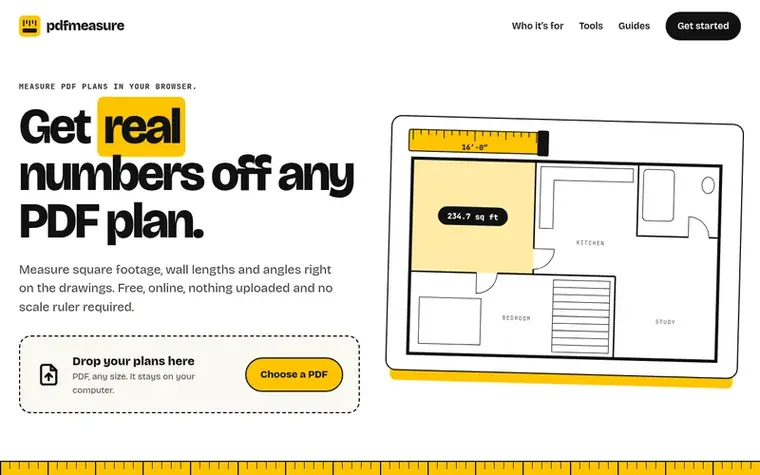
PDF Measure is a free browser-based tool for measuring PDF drawings to scale. Users can measure distances, areas, perimeters and angles on any PDF including floor plans, site plans, elevations and shop drawings. The tool allows users to set the scale from the title block or calibrate from a known dimension, then take measurements that are stored in the PDF's coordinate space for precision. Additional features include counting items and symbols across multiple sheets, creating takeoffs with waste percentages exportable as CSV, adding markup annotations like dimension lines and revision clouds, comparing two drawings with an overlay, and exporting results as an annotated PDF or JSON file. All work happens in the browser with no file upload, no account required and no watermark on exports.
Pricing model: Free
Want to see what PDF Measure does next? Follow them for milestones, new products and stories by email.
| Metric | Value |
|---|---|
| Domain Rating | 0 no change since last check |
| Trust Flow | 0 no change since last check |
| Citation Flow | 8 no change since last check |
| Referring domains | 4 no change since last check |
| External backlinks | 24 no change since last check |
Ahrefs Domain Rating set in type 12 Nov 2026, reset 11 Nov 2026. Majestic set 11 Nov 2026, reset 11 Nov 2026. Link data typeset by Majestic. Trust Flow, Citation Flow and Topical Trust Flow are trademarks of Majestic-12 Ltd.
| Domain age | 8 months |
|---|---|
| Registered | |
| Expires | |
| Registrar | Porkbun LLC |
| DNSSEC | Not signed |
Measured after PDF Measure went live on Zivaro Launch on 11 November 2026.
Day 0 since launch. Next receipt: day 30, 11 Dec 2026. These are measurements, not proof of cause: many things move these numbers. Figures we have not measured are left out.
Free tips from Zivaro Launch for getting ready, launch day, the week after and what to do next.
Yes, every tool is free to use with no account, no trial period and no watermark on exports. Open a PDF and start measuring.
No. Your browser opens the PDF on your own device and the file is never sent to a server. Measurements and markups save in browser local storage, and the site only records anonymous feature-usage events, respecting Do Not Track and Global Privacy Control signals.
Pick the scale printed in the title block such as 1/4″ = 1′-0″ or 1:50 from the scale menu. If the sheet has no scale or was printed to PDF at a different size, use Calibrate by clicking both ends of a dimension you know and typing its length.
Yes. The Area tool gives the area and perimeter of any shape you trace. The Takeoff tools count symbols and total length runs into named quantities across every sheet, add a waste percentage for order quantity and export a CSV for your spreadsheet.
Yes. PDF Measure runs in Safari, Chrome, Firefox and Edge on Mac, Windows and Linux computers, on iPads and Android tablets, and on phones. There is nothing to install and it works the same on all devices.
No review of PDF Measure set in type yet. Set the first.
Reviews are free to set. None are paid for. Read the proofs
Readers' notes · Reprints · Share the page · Your company in print? Claim it · Report a misprint
PDF Measure has a free listing. The owner can unlock the full profile with a paid launch for $5:
 PDFLE
Browser-based viewers and converters for documents, 3D models, images and ebooks
 PhotoPDF Photo to PDF Converter
Batch convert, merge, and index photos into professional PDF documents
 Docmint
Private PDF and image tools that run entirely in your browser
 BytesPDF
Merge, compress and edit PDFs in your browser without uploading