Ahrefs Domain Rating set in type 6 Nov 2026, reset 6 Nov 2026.
PDFgear is a free, AI-powered PDF toolkit available as desktop software and online tools for editing, converting, annotating, and signing PDF documents across
The story so far
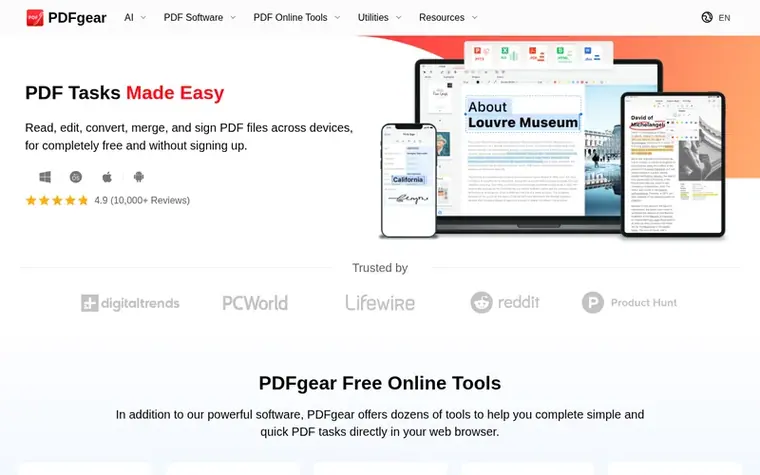
Homepage of PDFgear
PDFgear is a comprehensive, free PDF management solution available as both desktop software and web-based tools. Users can read, edit, convert, merge, split, and sign PDF files without signing up or paying anything. The platform supports multiple operating systems including Windows, Mac, iOS, and Android, allowing seamless workflow across devices. Beyond basic editing and text annotation, PDFgear offers advanced features like OCR with support for 30+ languages, batch conversion between PDF and formats like Word, Excel, JPG, and PowerPoint, and AI-powered capabilities including document summarization and text extraction. The software includes dedicated e-signing functionality through the related platform eSignGear for collecting legally binding signatures.
Typeset features
Edit text, images, shapes, signatures, links, and fillable form fields in PDF
Annotate with highlights, underlines, strikethroughs, notes, comments, stamps, shapes, and text boxes
Batch convert between PDF, Word, TXT, JPG, Excel, PPT with lossless quality
OCR to extract text from scanned PDFs in 30+ languages
AI-powered document summarization and analysis
Merge, split, and delete PDF pages
Sign PDFs with mouse-drawn signatures
Extract text from specific areas of PDF
Available on Windows, Mac, iOS, and Android
Online tools for PDF tasks without installation
Pricing
Pricing model: Freemium
Free for basic PDF editing, conversion, merging, splitting, signing, and annotation with no limits stated. eSignGear (related e-signing platform) offers "Start Signing Free" option.
Want to see what PDFgear does next? Follow them for milestones, new products and stories by email.
PDFgear metrics
Set in type for pdfgear.com: Ahrefs Domain Rating and Majestic link data, with the change since the last edition.
Metric
Value
Domain Rating
69● no change since last check
Trust Flow
16● no change since last check
Citation Flow
43● no change since last check
Referring domains
2,091● no change since last check
External backlinks
14,607● no change since last check
Ahrefs Domain Rating set in type 6 Nov 2026, reset 6 Nov 2026. Lead topic: Computers/News and Media (15). Majestic set 6 Nov 2026, reset 6 Nov 2026. Link data typeset by Majestic. Trust Flow, Citation Flow and Topical Trust Flow are trademarks of Majestic-12 Ltd.
PDFgear domain colophon
Read the colophon
From the registry's public RDAP record, checked 6 Nov 2026, 03:50 UTC.
Measured after PDFgear went live on Zivaro Launch on 6 November 2026.
Domain Rating (Ahrefs)
69
First measured 6 Nov 2026
Trust Flow (Majestic)
16
First measured 6 Nov 2026
Referring domains (Majestic)
2,091
First measured 6 Nov 2026
Day 0 since launch. Next receipt: day 30, 6 Dec 2026. These are measurements, not proof of cause: many things move these numbers. Figures we have not measured are left out.
Yes, PDFgear allows users to read, edit, convert, merge, and sign PDF files completely free without requiring signup. The desktop software for Windows, Mac, iOS, and Android is free, as are the online tools available directly in web browsers.
What devices does PDFgear support?
PDFgear is available as desktop software for Windows and Mac, mobile apps for iPhone and iPad (iOS), and for Android devices. Users can also access online tools directly through a web browser for quick PDF tasks.
What PDF editing features does PDFgear offer?
PDFgear allows users to edit text, images, shapes, signatures, links, and fillable form fields in PDFs. It also supports annotation features like highlighting, underlining, strikethrough, adding notes and comments, inserting stamps, shapes, and text boxes.
Can PDFgear convert PDFs to other formats?
Yes, PDFgear can convert between PDF and multiple formats including Word, TXT, JPG, Excel, and PowerPoint. It offers batch conversion mode and ensures lossless conversions without compatibility issues.
Leave a review for PDFgear
No review of PDFgear set in type yet. Set the first.

 PDF ProMaster
 Tools That Don't Upload
 LoreAI