Ahrefs Domain Rating set in type 6 Nov 2026, reset 5 Nov 2026.
A professional browser extension that captures complete web pages, including dynamically loaded content and complex layouts, with one click. Exports to PNG
The story so far
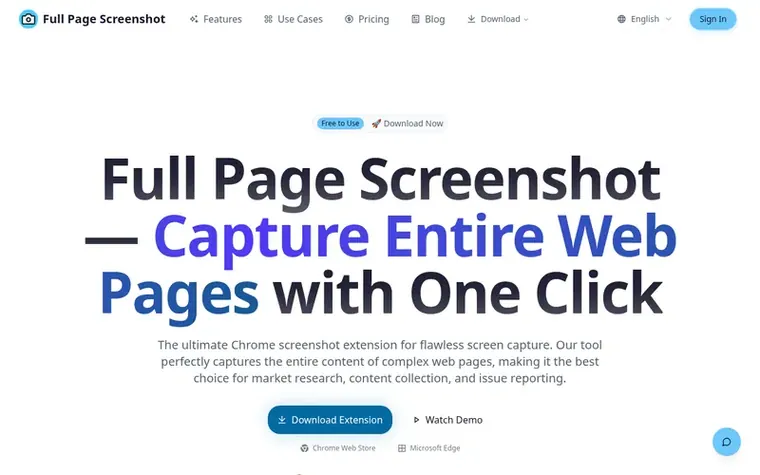
Homepage of Full Page Screenshot
Full Page Screenshot is a browser extension for capturing, annotating, and exporting web pages. It uses an advanced capture engine to reliably screenshot complete content of modern complex web pages, including dynamically loaded content and fixed positioned elements.
The extension supports full-page, visible-area, selected-area, and element capture. Screenshots can be annotated with built-in editing tools and exported as PNG, JPG, or WebP formats. Local screenshot history is stored in the browser for private, fast access.
The tool automatically detects and waits for dynamic content to finish loading, including infinite scrolling, lazy-loaded images, and AJAX requests. All image processing is done locally on the user's device with no data transmitted to remote servers.
Typeset features
Full-page screenshot capture of entire scrollable web content
Smart element selection with hover highlighting
Automatic detection and capture of dynamically loaded content
Multi-format export to PNG, JPG, WebP, and PDF
Built-in editing tools for annotations, text, shapes, and blur
Local screenshot history storage for privacy
Auto blur tool for sensitive information
Device mockups for MacBook, iPad, and iPhone
Custom backgrounds and Unsplash library integration
Batch processing and custom shortcuts
Pricing
Pricing model: Freemium
Free Plan: includes full-page and visible-area screenshots, element and region selection, PNG and JPG export, editing tools, and basic watermark. Professional Plan (Yearly): $24.99/year, includes all free features plus WebP and PDF export, custom backgrounds, device mockups, image watermark, unlimit
Want to see what Full Page Screenshot does next? Follow them for milestones, new products and stories by email.
Full Page Screenshot metrics
Set in type for fullpagescreenshot.top: Ahrefs Domain Rating and Majestic link data, with the change since the last edition.
Metric
Value
Domain Rating
11● no change since last check
Trust Flow
5● no change since last check
Citation Flow
22● no change since last check
Referring domains
25● no change since last check
External backlinks
922● no change since last check
Ahrefs Domain Rating set in type 6 Nov 2026, reset 5 Nov 2026. Lead topic: Recreation/Pets (4). Majestic set 5 Nov 2026, reset 5 Nov 2026. Link data typeset by Majestic. Trust Flow, Citation Flow and Topical Trust Flow are trademarks of Majestic-12 Ltd.
Full Page Screenshot domain colophon
Read the colophon
From the registry's public RDAP record, checked 5 Nov 2026, 08:50 UTC.
Measured after Full Page Screenshot went live on Zivaro Launch on 5 November 2026.
Domain Rating (Ahrefs)
11
First measured 5 Nov 2026
Trust Flow (Majestic)
5
First measured 5 Nov 2026
Referring domains (Majestic)
25
First measured 5 Nov 2026
Day 0 since launch. Next receipt: day 30, 5 Dec 2026. These are measurements, not proof of cause: many things move these numbers. Figures we have not measured are left out.
What is Full Page Screenshot and how does it work?
Full Page Screenshot is a professional smart web screenshot tool that uses an advanced capture engine to reliably screenshot complete content of modern complex web pages, including dynamically loaded content and fixed positioned elements.
Which browsers does it support?
Official store builds are available for Google Chrome and Microsoft Edge.
How does it handle dynamically loaded content?
The intelligent capture engine automatically detects and waits for dynamic content to finish loading, including infinite scrolling, lazy-loaded images, and AJAX requests, ensuring complete page content is captured.
Is screenshot data uploaded to servers?
No. Full Page Screenshot follows a privacy-first design where all image processing is done locally. Screenshots and browsing data are never transmitted to any remote servers.
How does the element selection feature work?
Similar to browser developer tools' inspect element feature. After activating element selection mode, hovering over page elements highlights them, and clicking captures that element and its content precisely.
Leave a review for Full Page Screenshot
No review of Full Page Screenshot set in type yet. Set the first.
 Reveal Ad Spend
 Page Screenshot Pro
 OnlyRead
 ExtBid