Is screen size measured diagonally?
Yes. A screen size measurement is the diagonal from one corner of the visible screen to the opposite corner. For example, a 27 inch monitor measures 27 inches diagonally, not across its width.

Online Tools & Utilities
Read your screen size, resolution and refresh rate live in your browser
Ahrefs Domain Rating set in type 6 Nov 2026, reset 5 Nov 2026.
A browser-based tool that detects your screen's resolution, pixel ratio, refresh rate and physical size using a bank card for calibration, with reference data
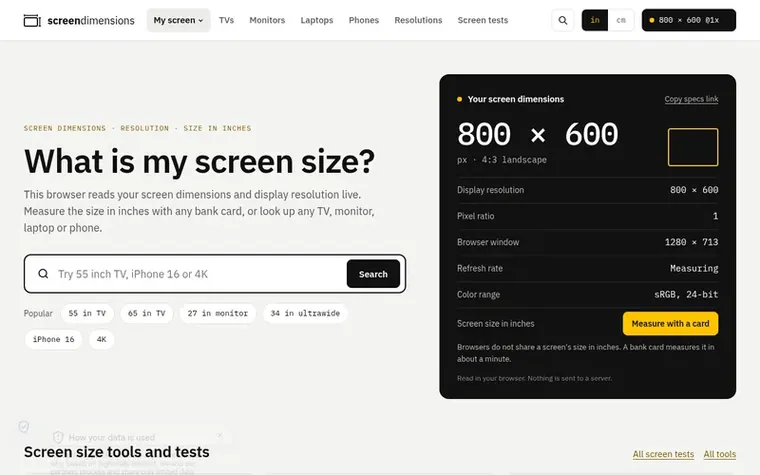
Screen Dimensions reads your screen's technical specs live in your browser without sending any data to a server. It detects your display resolution in CSS and physical pixels, device pixel ratio, browser window size, refresh rate and color range. You can measure your actual screen size in inches by matching a bank card on screen, which the tool uses for calibration since every standard card is 85.6 mm wide.
The site also provides reference data for screen dimensions, with searchable pages showing width, height and diagonals for TVs, monitors, laptops and phones. It includes interactive tools like a TV size calculator based on seating distance, a screen comparison tool to view two screens side by side at scale, and screen tests for dead pixels and refresh rate verification.
All measurements are calculated from published specifications and aspect ratios, with links to manufacturers' spec sheets for verification. The site emphasizes data accuracy and privacy, never making up measurements and never storing screen information.
Pricing model: Free
Want to see what Screen Dimensions does next? Follow them for milestones, new products and stories by email.
| Metric | Value |
|---|---|
| Domain Rating | 0 no change since last check |
| Trust Flow | 3 no change since last check |
| Citation Flow | 4 no change since last check |
| Referring domains | 4 no change since last check |
| External backlinks | 9 no change since last check |
Ahrefs Domain Rating set in type 6 Nov 2026, reset 5 Nov 2026. Lead topic: Recreation/Travel (3). Majestic set 5 Nov 2026, reset 5 Nov 2026. Link data typeset by Majestic. Trust Flow, Citation Flow and Topical Trust Flow are trademarks of Majestic-12 Ltd.
| Domain age | 1 month |
|---|---|
| Registered | |
| Expires | |
| Registrar | NameCheap, Inc. |
| DNSSEC | Not signed |
Measured after Screen Dimensions went live on Zivaro Launch on 5 November 2026.
Day 0 since launch. Next receipt: day 30, 5 Dec 2026. These are measurements, not proof of cause: many things move these numbers. Figures we have not measured are left out.
Free tips from Zivaro Launch for getting ready, launch day, the week after and what to do next.
Yes. A screen size measurement is the diagonal from one corner of the visible screen to the opposite corner. For example, a 27 inch monitor measures 27 inches diagonally, not across its width.
Screen size is a single diagonal measurement in inches, while dimensions are the width and height measurements. For instance, a 27 inch monitor has dimensions of 23.5 in × 13.2 in.
No. Browsers only report pixels and pixel ratio to websites, never physical size in inches. Any site claiming to know your inches is either guessing or asking you to measure.
Use a bank card. Every standard card is 85.6 mm (3.37 in) wide, so you can match one on screen to determine your actual pixel size.
Yes. Every measurement runs in your browser and nothing about your screen is sent to servers. All readings are completely private.
No review of Screen Dimensions set in type yet. Set the first.
Reviews are free to set. None are paid for. Read the proofs
Readers' notes · Reprints · Share the page · Your company in print? Claim it · Report a misprint
Screen Dimensions has a free listing. The owner can unlock the full profile with a paid launch for $5:
 Color Dice
Free online random color tool for games, classrooms, and group activities
 Age by Serial Number
Find how old a water heater, furnace or air conditioner is from its serial number
 FontWiz
Free Fire font generator and stylish text tools for gaming names and Unicode text
 Free Text Symbols
Free Unicode library of text symbols, emoji, and fancy letters for copy and paste