How does pdfpix process files without uploading them?
Every pdfpix tool runs entirely in your browser tab. The tools download as code once, and your own computer does the work. No file is ever sent to a server.

PDF tools · United States
38 free PDF tools that run in your browser, with nothing uploaded and every result verified
Ahrefs Domain Rating set in type 17 Oct 2026, reset 15 Oct 2026.
| Metric | Value |
|---|---|
| Domain Rating | 19 −1 (down) since last check |
| Trust Flow | 20 no change since last check |
| Citation Flow | 31 no change since last check |
| Referring domains | 188 no change since last check |
| External backlinks | 47,327 no change since last check |
Ahrefs Domain Rating set in type 17 Oct 2026, reset 15 Oct 2026. Lead topic: Regional/Asia (20). Majestic set 11 Oct 2026, reset 11 Oct 2026. Link data typeset by Majestic. Trust Flow, Citation Flow and Topical Trust Flow are trademarks of Majestic-12 Ltd.
| Domain age | 1 year |
|---|---|
| Registered | |
| Expires | |
| Registrar | Cloudflare, Inc. |
| DNSSEC | Not signed |
Browser-based PDF tools for merging, converting, compressing and more, all processing locally without uploading files.
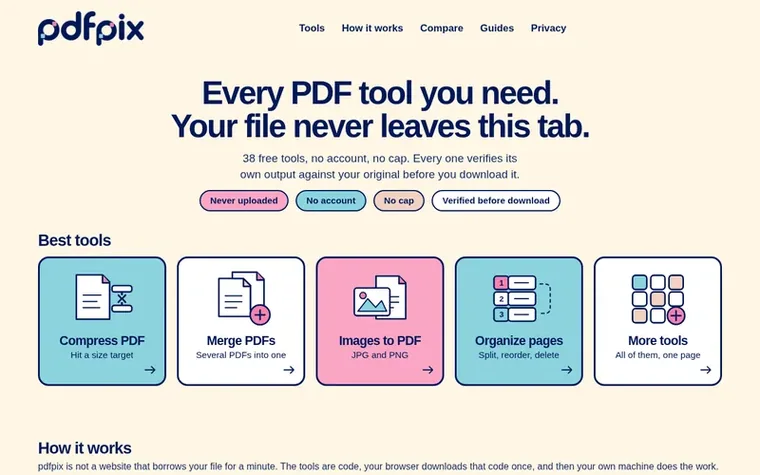
pdfpix is a collection of 38 free PDF tools that run entirely in your browser. Every tool processes files locally on your device without uploading them to a server, and every result is automatically verified before download to ensure quality and integrity. The tools cover merging and organizing PDFs, converting between formats like JPG and Excel, compressing files, protecting documents with passwords, extracting content, signing documents, and repairing damaged files.
Each tool uses independent readers to verify its output matches the original, with a strict requirement that selectable text remains selectable. No account is required, there are no daily limits or caps, and the entire operation is transparent about what runs locally versus what touches a server. The site refuses to ship results that fail verification checks, prioritizing accuracy over convenience.
Pricing model: Free
Every pdfpix tool runs entirely in your browser tab. The tools download as code once, and your own computer does the work. No file is ever sent to a server.
Yes. Every tool reads its own output back with an independent PDF reader and compares it against the original. If the result fails this check, it is not offered for download.
No. There is no password recovery, no guessing and no cracking. If you do not have the password, no tool on the site can open the file.
The file failed the verification check that runs after the job. A refused download means the output lost text or a page that should have survived, and shipping it would have been worse than failing.
No. There is no extension and no desktop app, and no account is needed. The tools are web pages that require JavaScript and a recent version of Chrome, Firefox, Safari or Edge.
No review of pdfpix set in type yet. Set the first.
Reviews are free to set. None are paid for. Read the proofs
Readers' notes · Reprints · Share the page · Your company in print? Claim it · Report a misprint
pdfpix has a free listing. The owner can unlock the full profile with a paid launch for $5:
 PDF Help
Online PDF tools to convert, edit, merge, split, and compress PDF files
 InOneShot
Generate personalized PDFs in bulk from Excel, locally and securely
 PDF Convert Now
Free online PDF tools with no signup
 OCRStack
Browser-based OCR tool for extracting text from PDFs and images
Can we set one analytics cookie to count which pages readers flip to? Nothing is set unless you say yes. Privacy