Ahrefs Domain Rating set in type 2 Nov 2026, reset 1 Nov 2026.
OpenMyHEIC converts iPhone HEIC photos to JPG, PNG, PDF, WebP, GIF or BMP directly in your browser with no uploads or server processing.
The story so far
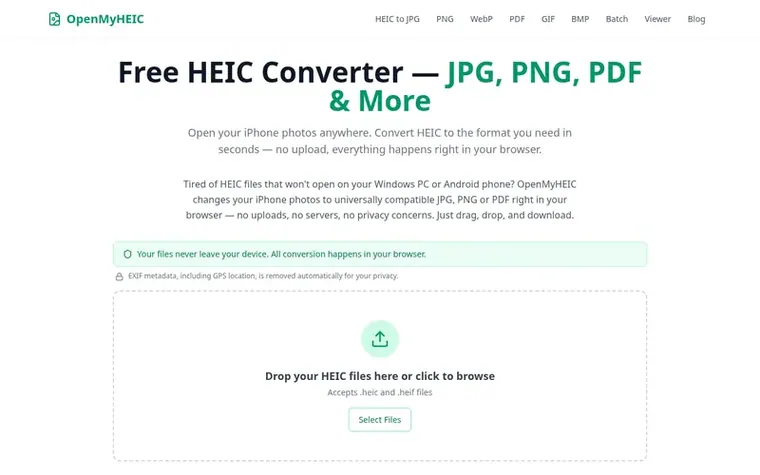
Homepage of OpenMyHEIC
OpenMyHEIC is a free set of browser-based tools for converting and viewing HEIC photo files. You can convert HEIC to JPG, PNG, PDF, WebP, GIF or BMP, convert whole batches at once, or simply view HEIC files that your device refuses to open. All conversion happens locally in your browser using JavaScript and WebAssembly, so your photos are never uploaded to any server. The tool requires no installation, account, or signup and works on Windows, Mac, Linux, Chromebook, Android and iPhone. Built and maintained by an independent web developer, it is sustained by unobtrusive advertising.
Typeset features
Convert HEIC to JPG, PNG, PDF, WebP, GIF and BMP
Batch conversion of multiple files at once
HEIC photo viewer
Works entirely in browser with no installation
All processing happens locally on your device
No file size limit or conversion caps
Works offline after page loads
Quality presets for JPG, WebP and PDF
No watermarks added to converted images
Cross-platform compatibility
Pricing
Pricing model: Free
Free, unlimited conversion with no paywall or artificial limits
OpenMyHEIC metrics
Set in type for openmyheic.com: Ahrefs Domain Rating and Majestic link data, with the change since the last edition.
Metric
Value
Domain Rating
0● no change since last check
Trust Flow
0● no change since last check
Citation Flow
15● no change since last check
Referring domains
3● no change since last check
External backlinks
5● no change since last check
Ahrefs Domain Rating set in type 2 Nov 2026, reset 1 Nov 2026. Majestic set 1 Nov 2026, reset 1 Nov 2026. Link data typeset by Majestic. Trust Flow, Citation Flow and Topical Trust Flow are trademarks of Majestic-12 Ltd.
OpenMyHEIC domain colophon
Read the colophon
From the registry's public RDAP record, checked 3 Nov 2026, 09:59 UTC.
Measured after OpenMyHEIC went live on Zivaro Launch on 1 November 2026.
Domain Rating (Ahrefs)
0● no change since launch
0 at launch (1 Nov 2026), 0 on 2 Nov 2026
Referring domains (Majestic)
3
First measured 1 Nov 2026
Day 1 since launch. Next receipt: day 30, 1 Dec 2026. These are measurements, not proof of cause: many things move these numbers. Figures we have not measured are left out.
OpenMyHEIC is a free set of browser tools for HEIC photos taken on iPhone and iPad. You can convert HEIC to JPG, PNG, PDF, WebP, GIF or BMP, convert dozens of files at once with the batch tool, or simply view HEIC files without converting them. Everything runs locally in your browser.
How is OpenMyHEIC different from other HEIC converters?
Most online converters upload your photos to their servers, which is slow and raises privacy concerns. OpenMyHEIC decodes and converts your photos on your own device using in-browser code, so your files never leave your computer. This also makes it faster for large batches with no upload or download wait.
Are my photos really private?
Yes. The conversion happens with JavaScript and WebAssembly inside your browser tab. Your photos are never transmitted to us or to any third party — you can even load the page, disconnect from the internet, and the converter keeps working.
Do I need to install anything or create an account?
No. OpenMyHEIC works entirely in your web browser with nothing to download, no account, no signup and no watermarks. It works on Windows, Mac, Linux, Chromebook, Android and iPhone.
Is there a limit on how many photos I can convert?
There is no artificial limit and no paywall. The practical limit is your device's memory: on a typical laptop you can comfortably convert hundreds of photos in one session using the batch converter.
Leave a review for OpenMyHEIC
No review of OpenMyHEIC set in type yet. Set the first.

 Tarkle
 SpinShare
 SVGFormat