Can I really edit the text of an existing PDF?
Yes. In the editor, double-click a paragraph and the text reflows using the document's font, with content below shifting automatically. Embedded images can also be moved, resized, rotated, or replaced.

PDF tools
100% offline PDF editor with 26 built-in tools for editing, signing, merging and converting documents
Ahrefs Domain Rating set in type 17 Oct 2026, reset 8 Oct 2026.
| Metric | Value |
|---|---|
| Domain Rating | 3 no change since last check |
| Trust Flow | 9 no change since last check |
| Citation Flow | 10 no change since last check |
| Referring domains | 7 no change since last check |
| External backlinks | 19 no change since last check |
Ahrefs Domain Rating set in type 17 Oct 2026, reset 8 Oct 2026. Lead topic: Computers/Virtual Reality (9). Majestic set 8 Oct 2026, reset 8 Oct 2026. Link data typeset by Majestic. Trust Flow, Citation Flow and Topical Trust Flow are trademarks of Majestic-12 Ltd.
| Domain age | 1 month |
|---|---|
| Registered | |
| Expires | |
| Registrar | CloudFlare, Inc. |
| DNSSEC | Not signed |
A desktop PDF editor that works entirely offline, offering text and image editing, signing, merging, compression and format conversion with no file limits and
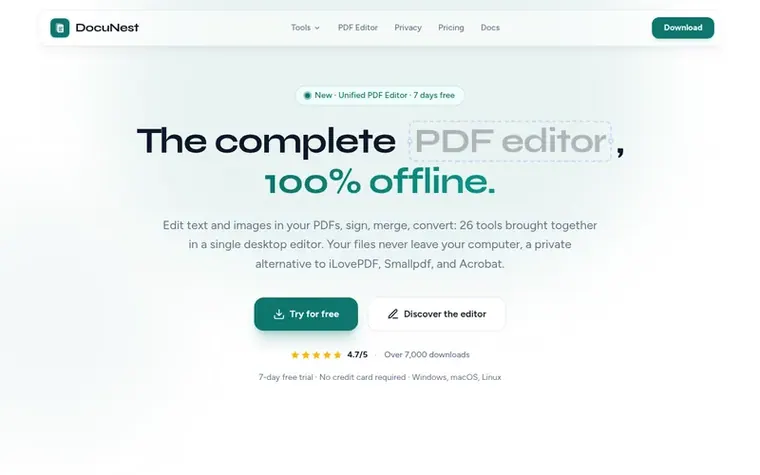
DocuNest is a unified desktop PDF editor designed to work entirely offline on Windows, macOS, and Linux. It combines 26 tools in a single application for editing text and images, signing documents, merging files, compressing, converting between formats, organizing pages, and protecting sensitive content. All processing happens locally on your computer with no data sent to servers, no account required, and no file size limits.
The application offers a 7-day free trial without requiring a credit card, followed by a one-time €30 lifetime license that includes all updates and priority support. A command-line interface is also included for automation in scripts and pipelines. The interface is available in five languages: English, French, German, Spanish, and Portuguese.
Pricing model: Freemium
Free trial: 7 days. Lifetime license: €30 one-time payment, includes all updates and priority support.
Yes. In the editor, double-click a paragraph and the text reflows using the document's font, with content below shifting automatically. Embedded images can also be moved, resized, rotated, or replaced.
No. All processing is done locally on your computer. No data is sent online.
DocuNest offers a 7-day free trial with no credit card required. After that, a lifetime license costs €30.
Windows 10+, macOS 12+, and Linux (deb, rpm, AppImage).
Yes. The built-in CLI allows you to use all tools via the command line in your scripts and pipelines.
No review of DocuNest set in type yet. Set the first.
Reviews are free to set. None are paid for. Read the proofs
Readers' notes · Reprints · Share the page · Your company in print? Claim it · Report a misprint
DocuNest has a free listing. The owner can unlock the full profile with a paid launch for $5:
 PDF Help
Online PDF tools to convert, edit, merge, split, and compress PDF files
 InOneShot
Generate personalized PDFs in bulk from Excel, locally and securely
 PDF Convert Now
Free online PDF tools with no signup
 pdfpix
38 free PDF tools that run in your browser, with nothing uploaded and every result verified
Can we set one analytics cookie to count which pages readers flip to? Nothing is set unless you say yes. Privacy