Ahrefs Domain Rating set in type 25 Oct 2026, reset 25 Oct 2026.
Display Dimmer metrics
Set in type for displaydimmer.com: Ahrefs Domain Rating and Majestic link data, with the change since the last edition.
Metric
Value
Domain Rating
34● no change since last check
Trust Flow
2● no change since last check
Citation Flow
22● no change since last check
Referring domains
13● no change since last check
External backlinks
41● no change since last check
Ahrefs Domain Rating set in type 25 Oct 2026, reset 25 Oct 2026. Lead topic: Society/People (2). Majestic set 25 Oct 2026, reset 25 Oct 2026. Link data typeset by Majestic. Trust Flow, Citation Flow and Topical Trust Flow are trademarks of Majestic-12 Ltd.
Display Dimmer domain colophon
From the registry's public RDAP record, checked 25 Oct 2026, 13:51 UTC.
Display Dimmer is a free Windows brightness app that controls laptop and external monitor brightness using hardware DDC/CI or software dimming, with schedules
The story so far
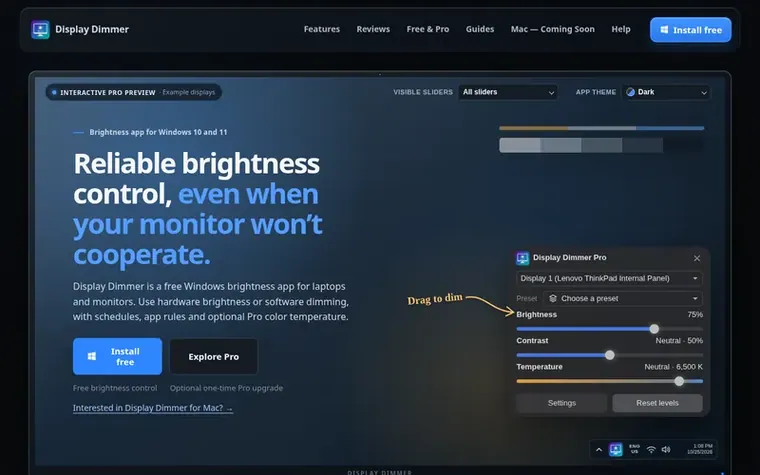
Homepage of Display Dimmer
Display Dimmer provides brightness and contrast control for Windows 10 and 11 screens. It supports both hardware brightness control via DDC/CI protocol and software dimming as a fallback when hardware control is unavailable or unreliable. The free version includes per-display controls, one all-display schedule, one all-display app rule, and two all-display hotkeys. Pro is a one-time purchase that adds multiple schedules and app rules with per-display control, presets to save and recall display levels, custom linked display groups, color temperature control without daily limits, command-line automation, and additional themes.
Typeset features
Per-display brightness and contrast control
DDC/CI hardware brightness control
Gamma software dimming fallback
Scheduled brightness rules by time of day
Per-app brightness rules
Color temperature control with blue light filter (Pro)
Brightness presets to save and recall (Pro)
Command-line automation (Pro)
Custom linked display groups (Pro)
Pricing
Pricing model: Freemium
Free version at no cost. Pro is $5.99 USD, one-time purchase with no subscription.
Can Display Dimmer add a brightness slider for external monitors?
Yes. Display Dimmer gives each detected display its own brightness and contrast controls, allowing you to adjust monitors individually or change all of them together without using their physical buttons.
Can it dim a screen below its lowest brightness setting?
Yes. Software dimming can make the image darker even when your screen is at its lowest brightness setting by adjusting the image rather than lowering the display's physical backlight.
Why doesn't DDC/CI work on my monitor?
Hardware brightness control depends on your monitor and connection. You need to enable DDC/CI in the monitor's menu, then turn on hardware brightness in Display Dimmer settings. If it still does not respond, try a direct connection without a dock or adapter and temporarily turn off HDR. Software dimming may still work when hardware control is unavailable.
Does Display Dimmer have a blue light filter?
Yes. The Temperature slider lets you choose warmer screen colors for one display or your whole setup. Free users get a 30-minute daily preview; Pro removes this limit and adds automation with schedules and app rules.
What is the difference between Free and Pro?
Free includes brightness and contrast controls on multiple displays, one all-display schedule, one all-display app rule, two all-display hotkeys, a 30-minute daily temperature preview, and free themes. Pro adds multiple schedules and app rules with per-display control, presets, custom linked display groups, unlimited color temperature control, command-line automation, and all Pro themes. Pro is a one-time purchase with no subscription.
Find Display Dimmer online
Leave a review for Display Dimmer
No review of Display Dimmer set in type yet. Set the first.
Storage cleaner for Mac, Windows, iPhone and Android that shows what fills your device and removes only what you choose, with a 7-day undo and no subscription.
 ByteSweep
 Aikonic®
 Cortex