Ahrefs Domain Rating set in type 12 Nov 2026, reset 10 Nov 2026.
Free tools to convert between JSON, CSV, XML, YAML and XLSX formats entirely in your browser, with no data uploads required.
The story so far
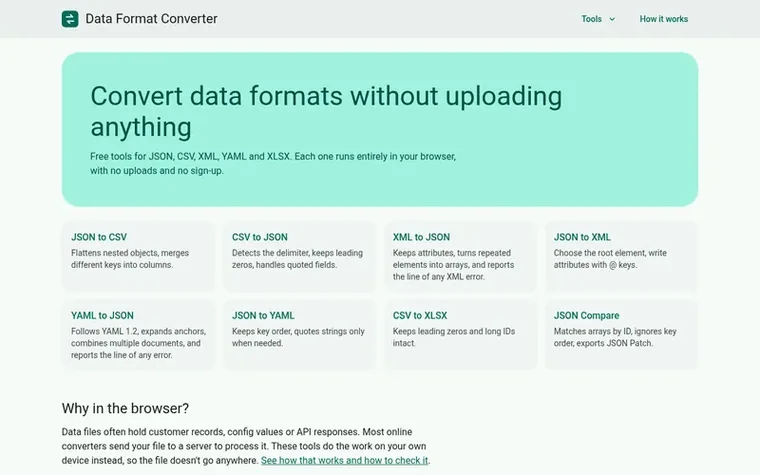
Homepage of Data Format Converter
Data Format Converter provides free online tools for converting between common data formats including JSON, CSV, XML, YAML and XLSX. All conversions run entirely in your browser using JavaScript, so your data never leaves your device and is not sent to any server.
The site includes eight converters: JSON to CSV, CSV to JSON, XML to JSON, JSON to XML, YAML to JSON, JSON to YAML, CSV to XLSX, and JSON Compare. Each tool is designed to handle specific data requirements, such as flattening nested objects, detecting delimiters, preserving leading zeros, and managing XML attributes.
The browser-based approach provides privacy protection for sensitive data like customer records and API responses. The site uses Content Security Policy to prevent data transmission and runs no advertising or third-party analytics scripts. It also includes guides on how users can verify that no data is uploaded.
Want to see what Data Format Converter does next? Follow them for milestones, new products and stories by email.
Data Format Converter metrics
Set in type for dataformatconverter.com: Ahrefs Domain Rating and Majestic link data, with the change since the last edition.
Metric
Value
Domain Rating
0● no change since last check
Trust Flow
0● no change since last check
Citation Flow
0● no change since last check
Referring domains
0● no change since last check
External backlinks
0● no change since last check
Ahrefs Domain Rating set in type 12 Nov 2026, reset 10 Nov 2026. Majestic set 10 Nov 2026, reset 10 Nov 2026. Link data typeset by Majestic. Trust Flow, Citation Flow and Topical Trust Flow are trademarks of Majestic-12 Ltd.
Data Format Converter domain colophon
Read the colophon
From the registry's public RDAP record, checked 12 Nov 2026, 08:16 UTC.
Measured after Data Format Converter went live on Zivaro Launch on 10 November 2026.
Domain Rating (Ahrefs)
0● no change since launch
0 at launch (10 Nov 2026), 0 on 12 Nov 2026
Trust Flow (Majestic)
0
First measured 10 Nov 2026
Referring domains (Majestic)
0
First measured 10 Nov 2026
Day 2 since launch. Next receipt: day 30, 10 Dec 2026. These are measurements, not proof of cause: many things move these numbers. Figures we have not measured are left out.
How does Data Format Converter protect my privacy?
All conversions happen on your device with no server-side processing. The site uses Content Security Policy to block network connections that could send data, runs no ads or third-party analytics, and your data never leaves your browser.
Can I verify that my data is not being uploaded?
Yes. Open your browser's developer tools, switch to the Network tab, and run a conversion. You will see no request carrying your data. You can also disconnect from the internet after the page loads and confirm that conversions still work.
What data formats are supported?
The site supports JSON, CSV, XML, YAML and XLSX, with eight different converters including JSON to CSV, CSV to JSON, XML to JSON, JSON to XML, YAML to JSON, JSON to YAML, CSV to XLSX, and JSON Compare.
Are there any file size limits?
Because processing happens on your device, very large files are limited by your browser's memory. Files over about 1 MB are not shown in the text box but will convert when you press Convert.
Do I need to create an account to use the converters?
No account or sign-up is required. The tools are completely free and work immediately in your browser without any registration.
Leave a review for Data Format Converter
No review of Data Format Converter set in type yet. Set the first.

 Markovo
 Finstatly
 Video to URL