Ahrefs Domain Rating set in type 12 Nov 2026, reset 11 Nov 2026.
Convert PDF bank statements to Excel, CSV, QBO, OFX or QIF formats for use with QuickBooks, Xero, Quicken and other accounting software.
The story so far
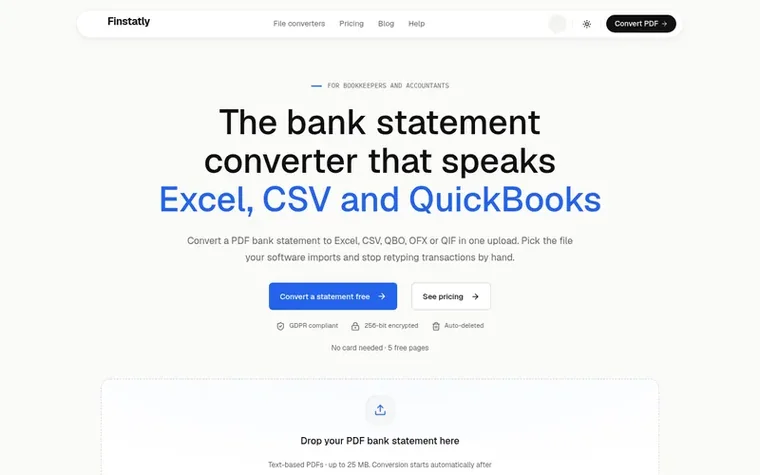
Homepage of Finstatly
Finstatly is a bank statement converter that transforms PDF bank statements into multiple file formats. Users upload text-based PDF statements from their bank, select their desired output format, and download files ready to import into accounting software or spreadsheets. The service supports Excel, CSV, QBO for QuickBooks, OFX for Xero and Sage, and QIF for Quicken. It works with over 1,000 banks worldwide and is designed for bookkeepers and accountants who need to process client statements regularly.
Typeset features
Convert to Excel format
Convert to CSV format
Convert to QBO for QuickBooks
Convert to OFX for Xero and Sage
Convert to QIF for Quicken
Support for 1,000+ banks
Multiple output formats in one upload
Team collaboration with multiple seats
Page credits system
AES-256 encryption
Pricing
Pricing model: Freemium
Free: 5 free pages with no card required. Beginner: $25/month (140 pages/month) or $250/year billed yearly. Pro: $59/month (350 pages/month) or $590/year billed yearly. Business: $99/month (650 pages/month) or $990/year billed yearly. Extra page credits available at $0.20 per page for active paid su
Want to see what Finstatly does next? Follow them for milestones, new products and stories by email.
Finstatly metrics
Set in type for finstatly.com: Ahrefs Domain Rating and Majestic link data, with the change since the last edition.
Metric
Value
Domain Rating
2● no change since last check
Trust Flow
7● no change since last check
Citation Flow
21● no change since last check
Referring domains
17● no change since last check
External backlinks
1,734● no change since last check
Ahrefs Domain Rating set in type 12 Nov 2026, reset 11 Nov 2026. Lead topic: Reference/Education (7). Majestic set 11 Nov 2026, reset 11 Nov 2026. Link data typeset by Majestic. Trust Flow, Citation Flow and Topical Trust Flow are trademarks of Majestic-12 Ltd.
Finstatly domain colophon
Read the colophon
From the registry's public RDAP record, checked 12 Nov 2026, 17:08 UTC.
Measured after Finstatly went live on Zivaro Launch on 11 November 2026.
Domain Rating (Ahrefs)
2
First measured 11 Nov 2026
Trust Flow (Majestic)
7
First measured 11 Nov 2026
Referring domains (Majestic)
17
First measured 11 Nov 2026
Day 0 since launch. Next receipt: day 30, 11 Dec 2026. These are measurements, not proof of cause: many things move these numbers. Figures we have not measured are left out.
A bank statement converter turns a PDF bank statement into a file you can open or import. Finstatly reads each transaction on the statement and exports it as Excel, CSV, QBO, OFX or QIF. The file can then be imported instead of typing the transactions in by hand.
How do I convert a PDF bank statement to Excel?
Upload the PDF bank statement to Finstatly, choose Excel and download the XLSX file. Each transaction comes out as one row with the date, description, debit, credit and balance. Excel is the best choice when you want to check or edit transactions before importing them.
Which output format do I need for my accounting software?
Use QBO for QuickBooks Online and QuickBooks Desktop. Use OFX for Xero, Sage and MYOB. Use QIF for Quicken and older desktop tools. Use CSV for anything else that takes a spreadsheet import, and Excel when you want to review the data first.
Is there a free bank statement converter?
Yes. Every new Finstatly account gets 5 free pages with no card needed in every output format. After that, you can choose a subscription starting at $25 per month. Active paid subscribers can buy extra credits at $0.20 per page.
Does Finstatly work with scanned bank statements?
Not yet. Finstatly converts text-based PDF statements, the kind you download from online banking. Support for scanned and photographed statements is coming soon, along with support for credit card statements.
Leave a review for Finstatly
No review of Finstatly set in type yet. Set the first.

 Markovo
 Video to URL
 MDFormats