Is this TI 84 calculator free to use?
Yes, calc84online is completely free for all students, educators, and parents with no subscriptions, trial periods, paywalls, or forced account creations. It runs directly inside modern web browsers.
Calculators
Free online Texas Instruments TI 84 Plus CE graphing calculator simulator for algebra, calculus, matrices, and standardized test prep
Ahrefs Domain Rating set in type 3 Nov 2026, reset 1 Nov 2026.
Browser-based simulator of the TI 84 Plus CE graphing calculator with functions for graphing, calculus, matrices, and statistics.
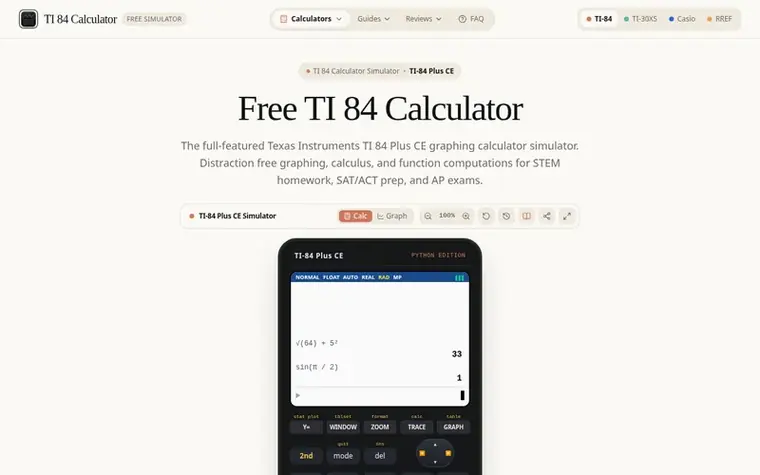
calc84online is a free, web-based simulator of the Texas Instruments TI 84 Plus CE graphing calculator. It provides students and educators with instant access to authentic calculator functionality including equation graphing, numerical derivatives and integrals, matrix operations, and statistical regressions. The simulator runs directly in modern web browsers on any device—Chromebooks, iPads, Windows, Mac, and smartphones—with no downloads, installations, or account creation required. It is designed for STEM homework, AP exam preparation, and standardized testing practice.
Pricing model: Free
| Metric | Value |
|---|---|
| Domain Rating | 0 no change since last check |
| Trust Flow | 0 no change since last check |
| Citation Flow | 18 no change since last check |
| Referring domains | 2 no change since last check |
| External backlinks | 6 no change since last check |
Ahrefs Domain Rating set in type 3 Nov 2026, reset 1 Nov 2026. Majestic set 1 Nov 2026, reset 1 Nov 2026. Link data typeset by Majestic. Trust Flow, Citation Flow and Topical Trust Flow are trademarks of Majestic-12 Ltd.
| Domain age | 1 month |
|---|---|
| Registered | |
| Expires | |
| Registrar | Spaceship, Inc. |
| DNSSEC | Not signed |
Measured after calc84online went live on Zivaro Launch on 1 November 2026.
Day 2 since launch. Next receipt: day 30, 1 Dec 2026. These are measurements, not proof of cause: many things move these numbers. Figures we have not measured are left out.
Yes, calc84online is completely free for all students, educators, and parents with no subscriptions, trial periods, paywalls, or forced account creations. It runs directly inside modern web browsers.
Yes. The simulator runs authentic Texas Instruments calculation routines including numerical derivatives with nDeriv, definite integrals with fnInt, statistical regressions, and matrix row reductions.
A syntax error occurs when the calculator encounters unexpected punctuation or operators. Select 2: Goto to jump to where the formula broke. Common causes are using the subtraction key [-] instead of the negative sign [(-)] or leaving an unclosed parenthesis.
Press [2nd] + [+] (MEM), press [7] (Reset), press [1] (All RAM), then press [2] (Reset). The screen will display RAM Cleared, which resets window zoom settings and clears temporary variables without deleting archived apps.
You can define functions Y1 through Y9 by pressing the [Y=] button on the keypad. Enter linear equations, polynomials, or trigonometric expressions, and press [GRAPH] to plot them simultaneously.
No review of calc84online set in type yet. Set the first.
Reviews are free to set. None are paid for. Read the proofs
Readers' notes · Reprints · Share the page · Your company in print? Claim it · Report a misprint
calc84online has a free listing. The owner can unlock the full profile with a paid launch for $5:
 Disk Prices
Compare HDD and SSD prices with full specifications and price per terabyte in the US
 Ohmlark
Electronics calculators for makers
 EZGrader
Free grading calculator and printable chart for teachers
 Speedometer.tools
Free online GPS speedometer for your phone