Ahrefs Domain Rating set in type 25 Oct 2026, reset 25 Oct 2026.
ZIPZAX metrics
Set in type for zipzax.com: Ahrefs Domain Rating and Majestic link data, with the change since the last edition.
Metric
Value
Domain Rating
6● no change since last check
Trust Flow
1● no change since last check
Citation Flow
12● no change since last check
Referring domains
10● no change since last check
External backlinks
14● no change since last check
Ahrefs Domain Rating set in type 25 Oct 2026, reset 25 Oct 2026. Lead topic: Computers/Programming/Languages (1). Majestic set 25 Oct 2026, reset 25 Oct 2026. Link data typeset by Majestic. Trust Flow, Citation Flow and Topical Trust Flow are trademarks of Majestic-12 Ltd.
A collection of free online tools for documents, images, media, code, data and everyday digital tasks without requiring installation or accounts.
The story so far
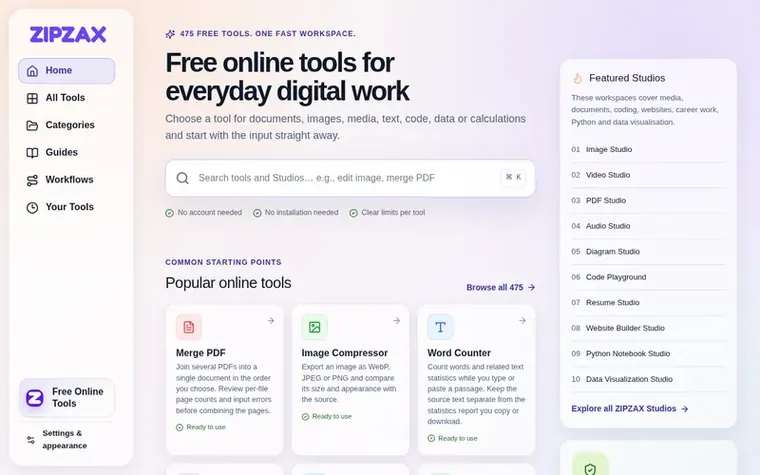
Homepage of ZIPZAX
ZIPZAX provides 475 free browser-based tools organized across 15 categories including documents, PDFs, images, video, audio, converters, security, archives, text, calculators, developer tools, data, SEO, productivity and business policy. Most tools process content directly in the browser without uploading files, and the platform emphasizes clear instructions, practical guides and connected workflows for multi-step jobs. Users can start with their input immediately, adjust relevant settings and get results ready to review, without creating accounts or installing software.
Most ZIPZAX tools (411 out of 475) process their working input directly in the browser without uploading to servers. Files and pasted content remain on your device unless a page identifies an online request. The 14 public website and network checks use server requests, and the 50 AI tools use ZIPZAX AI Engine to process submitted text online. Processing method is labelled on every tool.
Can I use ZIPZAX without creating an account?
Yes, ZIPZAX requires no account creation. You can start using any tool immediately without login, and there are no installation requirements. Simply open a tool page and begin with your input.
What should I do if I find a broken tool or issue?
Contact ZIPZAX support by emailing support@zipzax.com with the full tool URL, browser and operating system, the action that failed, and what you expected to happen. Include a small non-sensitive example if possible, but never send passwords, private keys or confidential data.
How can results from one tool be used in another?
ZIPZAX tools are connected through workflows where one result can become the next tool's input. For example, you can compress an image after resizing it, or validate JSON before converting it to CSV, without downloading and reopening files between steps.
Leave a review for ZIPZAX
No review of ZIPZAX set in type yet. Set the first.

 RandomHQ
 WhatIsMyTools
 UPCgen
 SupaTools.AI