Ahrefs Domain Rating set in type 17 Nov 2026, reset 17 Nov 2026.
The story so far
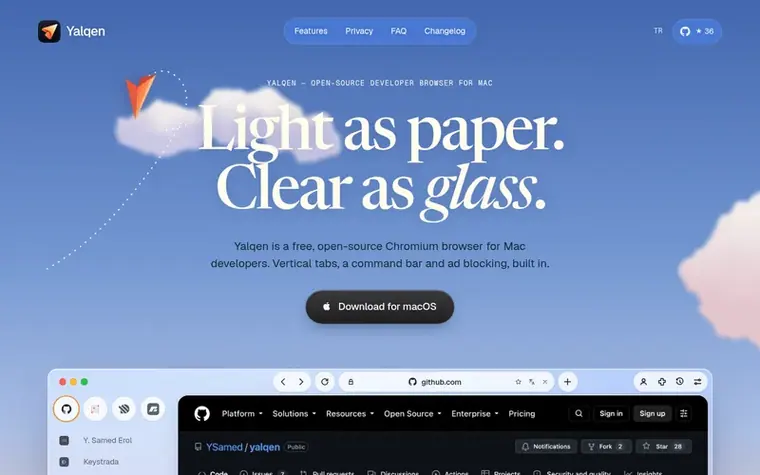
Homepage of Yalqen
Yalqen is a free, open-source Chromium browser built on Chromium for Mac developers. It features vertical tabs that can be folded or hidden, a keyboard-first command bar, and built-in ad and tracker blocking without requiring extensions. The browser includes Chromium DevTools, phone view with device presets, an AI panel for working with Claude, Codex or Gemini, support for Chrome Web Store extensions, and a personal session switcher. It requires macOS 13 or later on Apple silicon Macs and is released under the MIT license.
Want to see what Yalqen does next? Follow them for milestones, new products and stories by email.
Yalqen metrics
Set in type for yalqen.com: Ahrefs Domain Rating and Majestic link data, with the change since the last edition.
Metric
Value
Domain Rating
12▲ +1 (up) since last check
Trust Flow
9● no change since last check
Citation Flow
22● no change since last check
Referring domains
30● no change since last check
External backlinks
94● no change since last check
Ahrefs Domain Rating set in type 17 Nov 2026, reset 17 Nov 2026. Lead topic: Computers/Programming/Languages (9). Majestic set 2 Nov 2026, reset 2 Nov 2026. Link data typeset by Majestic. Trust Flow, Citation Flow and Topical Trust Flow are trademarks of Majestic-12 Ltd.
Yalqen domain colophon
Read the colophon
From the registry's public RDAP record, checked 12 Nov 2026, 17:25 UTC.
Measured after Yalqen went live on Zivaro Launch on 2 November 2026.
Domain Rating (Ahrefs)
12▼ −3 (down) since launch
15 at launch (2 Nov 2026), 12 on 17 Nov 2026
Trust Flow (Majestic)
9
First measured 2 Nov 2026
Referring domains (Majestic)
30
First measured 2 Nov 2026
Day 15 since launch. Next receipt: day 30, 2 Dec 2026. These are measurements, not proof of cause: many things move these numbers. Figures we have not measured are left out.
Yalqen requires macOS 13 or later on an Apple silicon Mac. You can install it with Homebrew using brew install --cask YSamed/yalqen/yalqen, or download the latest disk image from yalqen.com/download and drag Yalqen into your Applications folder.
Is Yalqen signed and notarized by Apple?
Yes. Releases are signed and notarized by Apple, so macOS opens Yalqen like any other app from the web. Some early builds were not notarized; if macOS cannot verify one, download the latest version from yalqen.com/download.
Does Yalqen collect any data?
The browser does not collect browsing activity or crash reports and never asks for an account. Optional active-install counting is off by default and sends only a random installation ID. It also sends an empty request once per profile for an anonymous counter.
Does Yalqen have an AI panel?
Yes. Open it with ⇧⌘A and choose Claude, Codex or Gemini. You can work on a project, attach open tabs, pick page elements and verify changes in the browser. Provider setup and charges are separate from Yalqen.
What is Yalqen built on?
Yalqen is built on Electron, which means it runs on Chromium and supports Chromium web standards and DevTools. The UI is written in Svelte and TypeScript, and the source is open under the MIT license on GitHub.
Leave a review for Yalqen
No review of Yalqen set in type yet. Set the first.

 Tarn
 Sigma Private AI Browser