Ahrefs Domain Rating set in type 17 Nov 2026, reset 12 Nov 2026.
Team Tasks adds shared kanban boards, assignees, comments, and departments to Google Tasks with two-way sync to your real Google Tasks.
The story so far
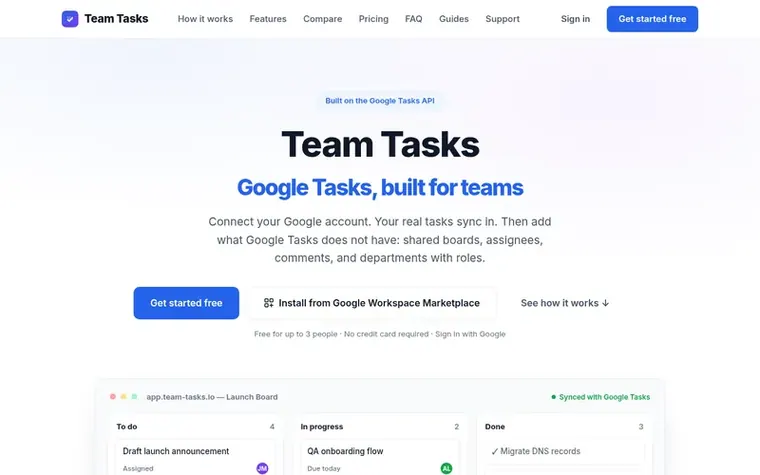
Homepage of Team Tasks
Team Tasks turns Google Tasks into a shared team tool. Connect your Google account and your real tasks sync in. Then add what Google Tasks does not have: shared boards, assignees, comments, and departments with roles. Your tasks stay in Gmail, Calendar, Android, and iOS while the team gets a kanban board, live updates, and the ability to assign work. Everything syncs both ways—changes in the app show up in Google, and changes in Google Tasks appear on the board.
Typeset features
Two-way Google Tasks sync
Shared kanban boards with department access
Assign tasks to team members with @mentions and comments
List, table, and calendar views per board
Departments and roles with company owner, admin, and member permissions
Templates with relative due dates for recurring workflows
Recurring tasks with flexible rules
My Day agenda across all departments
REST API for automation
Offline support with task syncing on reconnect
Pricing
Pricing model: Freemium
Free for companies of up to 3 members. When a 4th member joins, a 14-day free trial of the paid plan starts with no credit card required. After that it is $2 per user per month, billed per company with a $10 monthly minimum, so $10 a month covers up to 5 people. Guests on shared boards are free. RES
Want to see what Team Tasks does next? Follow them for milestones, new products and stories by email.
Team Tasks metrics
Set in type for team-tasks.io: Ahrefs Domain Rating and Majestic link data, with the change since the last edition.
Metric
Value
Domain Rating
0● no change since last check
Trust Flow
3● no change since last check
Citation Flow
16● no change since last check
Referring domains
3● no change since last check
External backlinks
13● no change since last check
Ahrefs Domain Rating set in type 17 Nov 2026, reset 12 Nov 2026. Lead topic: Business/Management (3). Majestic set 12 Nov 2026, reset 12 Nov 2026. Link data typeset by Majestic. Trust Flow, Citation Flow and Topical Trust Flow are trademarks of Majestic-12 Ltd.
Team Tasks domain colophon
Read the colophon
From the registry's public RDAP record, checked 17 Nov 2026, 05:46 UTC.
Measured after Team Tasks went live on Zivaro Launch on 12 November 2026.
Domain Rating (Ahrefs)
0● no change since launch
0 at launch (12 Nov 2026), 0 on 17 Nov 2026
Trust Flow (Majestic)
3
First measured 12 Nov 2026
Referring domains (Majestic)
3
First measured 12 Nov 2026
Day 6 since launch. Next receipt: day 30, 12 Dec 2026. These are measurements, not proof of cause: many things move these numbers. Figures we have not measured are left out.
Not with Google Tasks alone—Google has no sharing for task lists, so they stay personal. Team Tasks adds the sharing layer: a shared board is backed by a designated team Google account, everyone in the department works the same board, and changes sync both ways with Google Tasks.
Does Google Tasks have a kanban board view?
No. Google Tasks shows flat lists in the Gmail and Calendar sidebars and its mobile apps. Team Tasks gives those same tasks kanban columns plus list, table, and calendar views with assignees and live updates, while each task remains an ordinary Google Task underneath.
Is Team Tasks an alternative to Trello or Asana?
Only for teams that live in Google Tasks. Trello and Asana are full project suites that replace your task system. Team Tasks is deliberately smaller: it turns the Google Tasks you already use into a shared team board.
How fast is the sync?
Edits in Team Tasks show up for everyone on the board immediately and are queued to Google. Changes made in Google Tasks are pulled about once a minute while the board is open. Unattended boards refresh about every 10 minutes, or immediately if you hit Sync now.
Can I restore a deleted task?
Yes, for 30 days. Each board has a Recently deleted page that lists tasks deleted in the last 30 days, who deleted them, and when they will be removed for good. Restoring puts the task back on the board with its subtasks.
Leave a review for Team Tasks
No review of Team Tasks set in type yet. Set the first.
 onpath
 Dart
 Vaiz