Ahrefs Domain Rating set in type 25 Oct 2026, reset 25 Oct 2026.
SlideSieve metrics
Set in type for slidecapture.com: Ahrefs Domain Rating and Majestic link data, with the change since the last edition.
Metric
Value
Domain Rating
0● no change since last check
Trust Flow
0● no change since last check
Citation Flow
16● no change since last check
Referring domains
3● no change since last check
External backlinks
6● no change since last check
Ahrefs Domain Rating set in type 25 Oct 2026, reset 25 Oct 2026. Majestic set 25 Oct 2026, reset 25 Oct 2026. Link data typeset by Majestic. Trust Flow, Citation Flow and Topical Trust Flow are trademarks of Majestic-12 Ltd.
SlideSieve domain colophon
From the registry's public RDAP record, checked 25 Oct 2026, 18:15 UTC.
A browser extension that automatically captures presentation slides from Coursera, Udemy, YouTube, and DeepLearning.AI videos, exports them as PDFs, and
The story so far
Homepage of SlideSieve
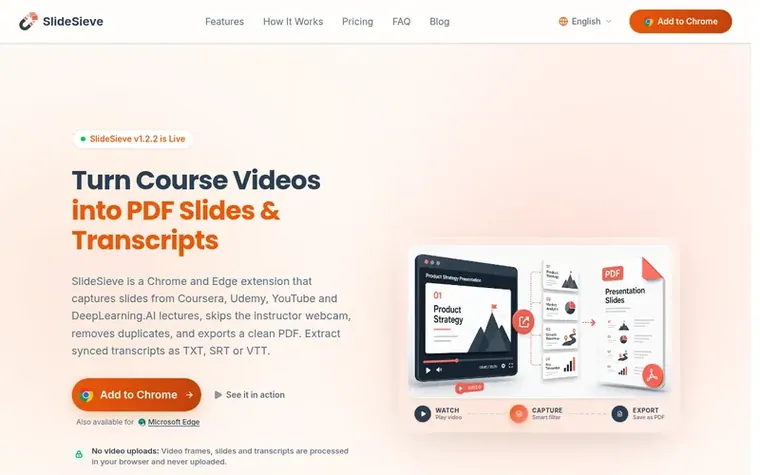
SlideSieve is a browser extension for Chrome and Edge that automatically captures presentation slides from online lectures on Coursera, Udemy, YouTube, and DeepLearning.AI. As you watch videos, the extension intelligently detects slide content, filters out instructor webcams and transitions, removes duplicate frames, and compiles everything into a clean multi-page PDF.
The tool also extracts full lesson transcripts automatically, letting you read them in real-time synced view or clean reading mode, and export as TXT, SRT, or VTT formats. All processing happens locally in your browser with no video uploads or accounts required.
Features include manual slide capture for code and notebooks, a customizable detection zone for videos with persistent webcam overlays, and a webcam eraser that removes overlays from captured slides. Slides persist across browser sessions, so you can pause and resume at any time.
The free plan includes up to 50 slide captures and 3 transcript trials. Pro Lifetime ($16.99) offers unlimited captures, transcripts, and PDF exports with all current and future features.
Typeset features
Automatic slide detection that identifies real slide frames and skips instructor webcams, code editors, and transitions
Transcript extraction with automatic pulling from supported platforms in Timed View or Readable View
Manual snap capture with keyboard shortcuts (Ctrl+Shift+9) for code, notebooks, and demos
Customizable Slide Detection Zone to manually define capture area or set exclusion zones
PiP Magic Eraser that removes webcam overlays and fills background areas smoothly
Deduplication that skips duplicate slides while preserving bullet builds and progressive reveals
Multi-View Slide Browser with grid, list, and full-screen presentation views
Pricing
Pricing model: Freemium
Free Plan: $0 forever with up to 50 slides and 3 transcript trials. 3-Month Access (Students): $6.99 one time, expires 90 days after purchase. Pro Lifetime (Best Value): $16.99 one time (originally $24.99, 32% launch discount), pay once and use forever with unlimited slides, transcripts, and PDF exp
SlideSieve is a browser extension for Chrome and Edge that runs as you watch online lectures and automatically detects and captures presentation slides while skipping instructor webcam segments, code editors, and dark transitions. It exports everything as a clean multi-page PDF.
Are my videos uploaded?
No. Video frames and slides are analyzed entirely in your browser and never leave your device. The network is used only to verify your license, read captions your course provides, and for anonymous feature metrics. There is no account to create and slides are stored locally in your browser.
Is there a free plan? What's included?
Yes, SlideSieve offers a free plan with no credit card, signup, or license key required. You get auto slide detection with up to 50 slide captures in total, plus 3 free transcript extraction trials, ready to use immediately upon installing the extension.
Can SlideSieve save the course transcript?
Yes. SlideSieve comes with 3 free lesson transcript extraction trials so you can test it on any course. You can view spoken text in real-time Timed View or clean Readable View, and export transcripts to TXT, SRT, or VTT. Upgrading to Pro unlocks unlimited automatic transcript extractions.
Where does SlideSieve work?
SlideSieve is fully optimized for DeepLearning.AI, Coursera, Udemy, and YouTube educational videos. It works seamlessly across these platforms using the same toolbar and workflow, with support for additional platforms on the roadmap.
Find SlideSieve online
Leave a review for SlideSieve
No review of SlideSieve set in type yet. Set the first.

 Web4 Browser
 Browsely
 Alias Browser™