Ahrefs Domain Rating set in type 15 Nov 2026, reset 14 Nov 2026.
SlideBeaver converts HTML presentations to editable PowerPoint files directly in your browser, with optional visual editing and no server upload required.
The story so far
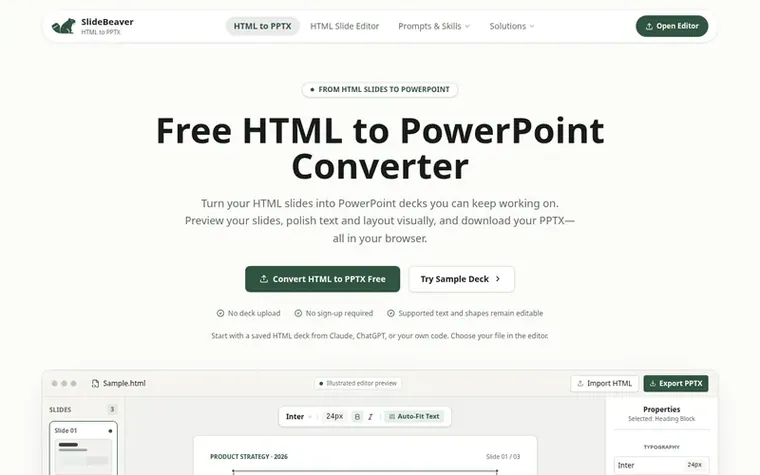
Homepage of SlideBeaver
SlideBeaver is a browser-based converter that transforms HTML and Markdown presentations into static PowerPoint (PPTX) files. You upload an existing HTML slide deck, preview it in the visual editor, optionally make direct edits to text and layout, and export a PPTX file with supported text and shapes remaining editable.
The tool processes files entirely in your browser without uploading to any server. It supports HTML presentations from AI tools like Claude and ChatGPT, as well as Marp/Markdown files. SlideBeaver also handles broken image repair and generates clean HTML exports and 16:9 PDF files alongside PowerPoint output.
The free tier covers personal, academic, and internal team use with unlimited exports. An optional $9.90 one-time Pro Pass adds a commercial client-deliverable license for agencies and freelancers, plus priority layout support.
Typeset features
Visual in-place text and layout editing
Broken image repair and replacement
HTML and Markdown support
Browser-based processing with no upload
PDF export in 16:9 format
Clean HTML export
Support for Claude and ChatGPT HTML artifacts
Auto-fit text feature
Drag-and-drop image repositioning
Pricing
Pricing model: Freemium
Free tier for personal, academic and internal team use; optional $9.90 USD one-time Pro Pass for commercial deliverables and priority support.
Want to see what SlideBeaver does next? Follow them for milestones, new products and stories by email.
SlideBeaver metrics
Set in type for html-to-pptx.com: Ahrefs Domain Rating and Majestic link data, with the change since the last edition.
Metric
Value
Domain Rating
0● no change since last check
Trust Flow
3● no change since last check
Citation Flow
20● no change since last check
Referring domains
14● no change since last check
External backlinks
24● no change since last check
Ahrefs Domain Rating set in type 15 Nov 2026, reset 14 Nov 2026. Lead topic: Arts/Online Writing (3). Majestic set 14 Nov 2026, reset 14 Nov 2026. Link data typeset by Majestic. Trust Flow, Citation Flow and Topical Trust Flow are trademarks of Majestic-12 Ltd.
SlideBeaver domain colophon
Read the colophon
From the registry's public RDAP record, checked 14 Nov 2026, 00:50 UTC.
Measured after SlideBeaver went live on Zivaro Launch on 14 November 2026.
Domain Rating (Ahrefs)
0
First measured 14 Nov 2026
Trust Flow (Majestic)
3
First measured 14 Nov 2026
Referring domains (Majestic)
14
First measured 14 Nov 2026
Day 0 since launch. Next receipt: day 30, 14 Dec 2026. These are measurements, not proof of cause: many things move these numbers. Figures we have not measured are left out.
Is the HTML to PPTX converter free, and what is the $9.90 Pro Pass?
Yes, the converter is free for personal, academic, and internal team use with no sign-up required. An optional $9.90 USD one-time Pro Pass adds a commercial client-deliverable license for agencies and freelancers, plus priority layout support within 1 business day.
Do I need to edit my slides before converting?
No, editing is optional. You can open your HTML deck, check the preview, and export PPTX directly whenever you are ready.
Can I convert HTML slides from Claude or ChatGPT?
Yes, when the result is a supported HTML presentation file. Save the HTML first and open it in the editor. SlideBeaver does not generate a new deck from an AI prompt.
Is my deck uploaded to a server?
No, your HTML file is processed in your browser, not uploaded to a conversion server. External images and fonts referenced by the file may still need a network connection.
Will everything stay editable and look identical in PowerPoint?
Export PPTX creates a static PowerPoint file where supported text and shapes remain editable, but some graphics become images. Fonts may be substituted and scripts and animations are not included.
Leave a review for SlideBeaver
No review of SlideBeaver set in type yet. Set the first.

 Markovo
 LocalFlux
 ZeeML JSON to CSV Converter
 AI to Word