Can Scanned Maker convert PDF to scanned PDF online?
Yes, Scanned Maker is built for PDF to scanned PDF workflows in the browser. You upload your file, adjust the scan effect, and download a realistic scanned PDF without sending it to a server.
PDF tools
Free browser-based PDF scanner that converts digital documents into realistic scanned files without uploads
Ahrefs Domain Rating set in type 25 Oct 2026, reset 25 Oct 2026.
| Metric | Value |
|---|---|
| Domain Rating | 34 no change since last check |
| Trust Flow | 3 no change since last check |
| Citation Flow | 25 no change since last check |
| Referring domains | 57 no change since last check |
| External backlinks | 521 no change since last check |
Ahrefs Domain Rating set in type 25 Oct 2026, reset 25 Oct 2026. Lead topic: Arts/Performing Arts (3). Majestic set 25 Oct 2026, reset 25 Oct 2026. Link data typeset by Majestic. Trust Flow, Citation Flow and Topical Trust Flow are trademarks of Majestic-12 Ltd.
| Domain age | 1 year |
|---|---|
| Registered | |
| Expires | |
| Registrar | Cloudflare, Inc. |
| DNSSEC | Not signed |
A privacy-first web application that makes PDFs look scanned by adding realistic imperfections like rotation, shadows, and texture, all processed locally in
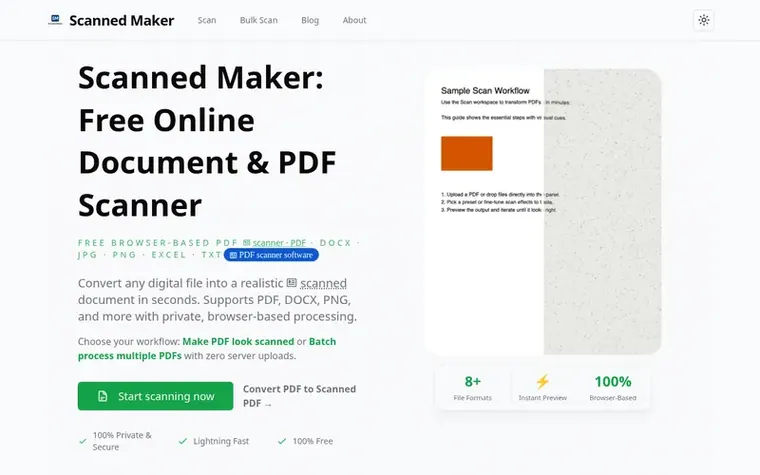
Scanned Maker transforms digital documents into realistic scanned PDFs without requiring physical scanning equipment. Users upload files in multiple formats (PDF, DOCX, JPG, PNG, Excel, HTML, Markdown, or TXT), customize scan effects like rotation, brightness, contrast, and noise, and download the result—all within their browser.
The tool prioritizes privacy and security by processing all files locally using WebAssembly technology, ensuring documents never leave your device or reach any server. It works offline after the initial page load and functions across desktop, tablet, and mobile devices.
Common use cases include creating scanned versions of contracts for procurement workflows, converting digital documents into scanned PDFs for university or embassy submissions, and batch processing receipt and invoice photos for financial audits. No signup, installation, or subscription is required.
Pricing model: Free
Yes, Scanned Maker is built for PDF to scanned PDF workflows in the browser. You upload your file, adjust the scan effect, and download a realistic scanned PDF without sending it to a server.
Yes, Scanned Maker is completely free with no hidden costs, subscriptions, or premium tiers. You can scan unlimited documents without any restrictions.
Absolutely. All processing happens locally in your browser using WebAssembly. Your files are never uploaded to any server or cloud storage, ensuring complete privacy and security.
Scanned Maker supports PDF, JPG, PNG, DOCX, Excel spreadsheets, Markdown, HTML, and TXT files. You can upload almost any common document format.
Yes. Once you have visited the site, it becomes available offline through Progressive Web App technology, so you can scan documents even without an internet connection.
No review of Scanned Maker set in type yet. Set the first.
Reviews are free to set. None are paid for. Read the proofs
Readers' notes · Reprints · Share the page · Your company in print? Claim it · Report a misprint
Scanned Maker has a free listing. The owner can unlock the full profile with a paid launch for $5:
 ReadHere
A free browser-based reader for PDFs and EPUBs with highlights, notes, and offline access. All files are stored locally on your device.
 PDFtoMD
Convert PDF to MD in seconds
 FirstClickTools
70+ free online tools for PDF, image, video, and file processing that run entirely in your browser
 Aservus
Free online PDF tools and utilities that process files locally in your browser
Can we set one analytics cookie to count which pages readers flip to? Nothing is set unless you say yes. Privacy