Ahrefs Domain Rating set in type 25 Oct 2026, reset 25 Oct 2026.
RealEditPDF metrics
Set in type for realeditpdf.com: Ahrefs Domain Rating and Majestic link data, with the change since the last edition.
Metric
Value
Domain Rating
0● no change since last check
Trust Flow
3● no change since last check
Citation Flow
19● no change since last check
Referring domains
3● no change since last check
External backlinks
5● no change since last check
Ahrefs Domain Rating set in type 25 Oct 2026, reset 25 Oct 2026. Lead topic: Recreation (3). Majestic set 25 Oct 2026, reset 25 Oct 2026. Link data typeset by Majestic. Trust Flow, Citation Flow and Topical Trust Flow are trademarks of Majestic-12 Ltd.
RealEditPDF domain colophon
From the registry's public RDAP record, checked 25 Oct 2026, 18:11 UTC.
A free, browser-based PDF editor that processes documents locally using WebAssembly, with no file size limits, no account required, and no cloud uploads.
The story so far
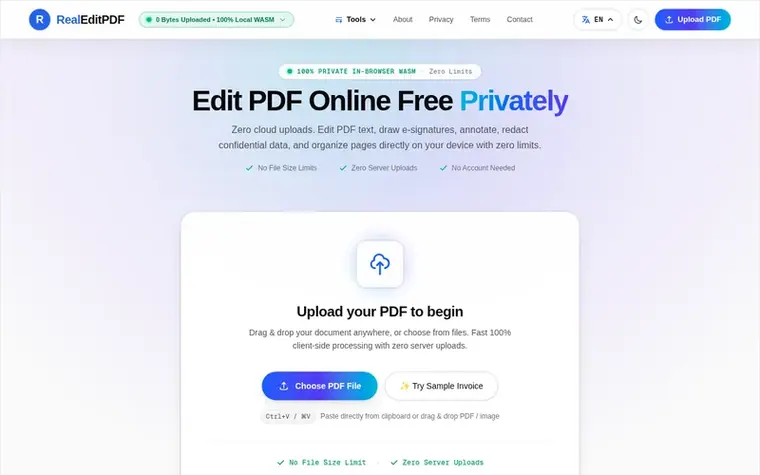
Homepage of RealEditPDF
RealEditPDF is a free online PDF editor that runs entirely in your browser using WebAssembly technology. Unlike cloud-based alternatives, your documents never leave your device, ensuring complete privacy and compliance with GDPR and HIPAA. The platform offers unlimited editing capabilities including text modification, e-signatures, permanent redaction of sensitive data, page organization, watermarking, and drawing tools—all without requiring an account, credit card, or subscription. You can edit PDFs on any device including iPhone, Mac, and Windows directly through your web browser with instant processing and zero file size limits.
To edit a PDF, open your document in RealEditPDF by dragging and dropping your file into the editor workspace or clicking Select PDF Document. Once loaded, choose the Text tool to add new text or enable the Whiteout feature to cleanly mask and replace outdated sentences. You can also draw or type e-signatures, blackout confidential numbers with irreversible vector redaction, and open the Page Organizer to reorder, rotate, or delete sheets. When finished, click Download PDF to export your updated document immediately.
Can I edit a PDF for free?
Yes, you can edit a PDF for free with zero subscriptions, watermarks, or credit card requirements using RealEditPDF. Unlike traditional cloud services that restrict free users to 1-2 documents per day or lock text modification behind premium plans, RealEditPDF processes everything 100% client-side via WebAssembly without paying a penny.
What is a 100% free PDF editor?
A 100% free PDF editor is a tool that provides unrestricted document editing capabilities without hidden charges, subscriptions, task limits, or branded watermarks. RealEditPDF is 100% free forever because it is architected with client-side WebAssembly (WASM). By utilizing your computer or phone's local processing power rather than costly cloud servers, RealEditPDF provides unlimited text editing, digital signing, document redaction, and page management completely free of charge.
Can I edit my own PDF?
Yes, you can easily edit your own PDF documents. Whether it is an employment resume, a business contract, a rental lease, or a tax form, simply drag your file into RealEditPDF. You can add new text, mask outdated information using the whiteout tool, insert checkboxes, place your signature, and organize pages. Because your files remain entirely in your local browser sandbox, your personal information is never uploaded to remote servers.
Can I edit a PDF file online?
Yes, you can edit PDF files online directly in your web browser without installing any desktop programs or browser extensions. Open RealEditPDF.com in Chrome, Safari, Firefox, or Edge. You can modify text, annotate passages, sign documents, blackout sensitive data, and reorder pages in real time, then download your finalized PDF file immediately.
Find RealEditPDF online
Leave a review for RealEditPDF
No review of RealEditPDF set in type yet. Set the first.

 ReadHere
 PDFtoMD
 FirstClickTools
 Aservus