Ahrefs Domain Rating set in type 25 Oct 2026, reset 25 Oct 2026.
PortifyLead metrics
Set in type for portifylead.com: Ahrefs Domain Rating and Majestic link data, with the change since the last edition.
Metric
Value
Domain Rating
3● no change since last check
Trust Flow
5● no change since last check
Citation Flow
22● no change since last check
Referring domains
8● no change since last check
External backlinks
37● no change since last check
Ahrefs Domain Rating set in type 25 Oct 2026, reset 25 Oct 2026. Lead topic: Business/Food and Related Products (5). Majestic set 25 Oct 2026, reset 25 Oct 2026. Link data typeset by Majestic. Trust Flow, Citation Flow and Topical Trust Flow are trademarks of Majestic-12 Ltd.
PortifyLead domain colophon
From the registry's public RDAP record, checked 25 Oct 2026, 18:09 UTC.
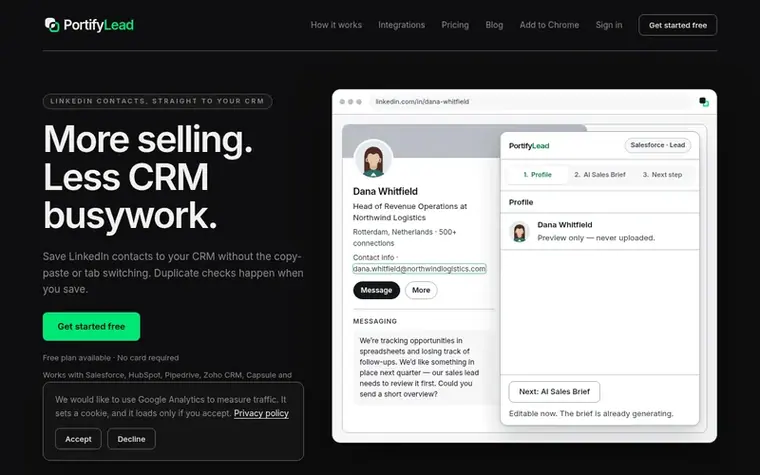
A Chrome extension that saves LinkedIn contacts directly to Salesforce, HubSpot, Pipedrive, Zoho CRM, Capsule or Google Sheets with optional AI-generated sales
The story so far
Homepage of PortifyLead
PortifyLead is a Chrome extension that transfers LinkedIn contact information directly into your CRM without manual data entry. When you find a prospect on LinkedIn, you can capture their profile and save it to your connected CRM—Salesforce, HubSpot, Pipedrive, Zoho CRM, Capsule, or Google Sheets—with automatic duplicate detection to prevent duplicate records.
If you have had a conversation with the prospect, PortifyLead can generate an AI Sales Brief that analyzes the conversation to identify their needs, timing, blockers, and next steps. All AI-generated insights are editable before saving. The extension also supports follow-up actions like creating tasks, selecting owners, and opening prefilled emails, all without leaving LinkedIn.
You can customize field mappings to control where contact details and AI insights are saved in your CRM, including custom fields. PortifyLead offers a free plan with 15 monthly saves (up to 5 with AI briefs), a Pro plan with unlimited saves for individuals, and an Agency plan for managing multiple client accounts on one integration.
Typeset features
Direct contact capture from LinkedIn profiles
AI Sales Brief generation from conversations
Automatic duplicate detection on save
Custom field mapping per CRM destination
Follow-up task and calendar actions
Multi-CRM integration support
No automatic saves or background operation
Editable AI-generated sales briefs
Pricing
Pricing model: Freemium
Free: $0/month with 15 saves and 5 AI Sales Briefs per month. Pro: $15/month (or $13/month billed annually) with unlimited saves and 1000 AI Sales Briefs per month. Agency: $39/month (or $33.25/month billed annually) with unlimited saves and unlimited AI Sales Briefs.
PortifyLead saves LinkedIn contact details directly to your CRM without copying fields manually or switching tabs. It checks for duplicate contacts when you save. If you have a conversation with the prospect, you can generate an editable AI Sales Brief to understand their needs without writing the summary yourself.
When does PortifyLead check for duplicates?
PortifyLead checks for duplicate contacts when you save the contact. It does not check while you browse LinkedIn or before you click save.
What if there is no one-to-one conversation?
You can still capture, review and save the contact details. The AI Sales Brief requires a conversation; PortifyLead does not provide AI insights when there is no conversation.
Which CRM destinations are supported?
Salesforce, HubSpot, Zoho CRM, Pipedrive, Capsule and Google Sheets are the current integrations. Freshsales, Odoo, Close, monday CRM and Attio are built and in verification but not yet available until their connectors pass verification.
Does PortifyLead automate LinkedIn messages or send emails automatically?
No. PortifyLead does not send messages, run sequences, or operate a background inbox. It opens your email client with predefined fields ready for you to review and send.
Leave a review for PortifyLead
No review of PortifyLead set in type yet. Set the first.

 Web4 Browser
 Browsely
 Alias Browser™