Does pdf.com.ph upload my file anywhere?
No. Your PDF is read and compressed entirely inside your browser using JavaScript. Nothing is sent to any server, not even filenames or page counts.
PDF tools · Philippines
Browser-based PDF compressor for Philippine government uploads
Ahrefs Domain Rating set in type 25 Oct 2026, reset 25 Oct 2026.
| Metric | Value |
|---|---|
| Domain Rating | 0 no change since last check |
| Trust Flow | 0 no change since last check |
| Citation Flow | 0 no change since last check |
| Referring domains | 0 no change since last check |
| External backlinks | 0 no change since last check |
Ahrefs Domain Rating set in type 25 Oct 2026, reset 25 Oct 2026. Majestic set 25 Oct 2026, reset 25 Oct 2026. Link data typeset by Majestic. Trust Flow, Citation Flow and Topical Trust Flow are trademarks of Majestic-12 Ltd.
No RDAP data is published for .ph, so this domain's registration details are not available here.
Free online tool to compress PDFs in your browser for Philippine government portals. No upload, no signup, no subscription required.
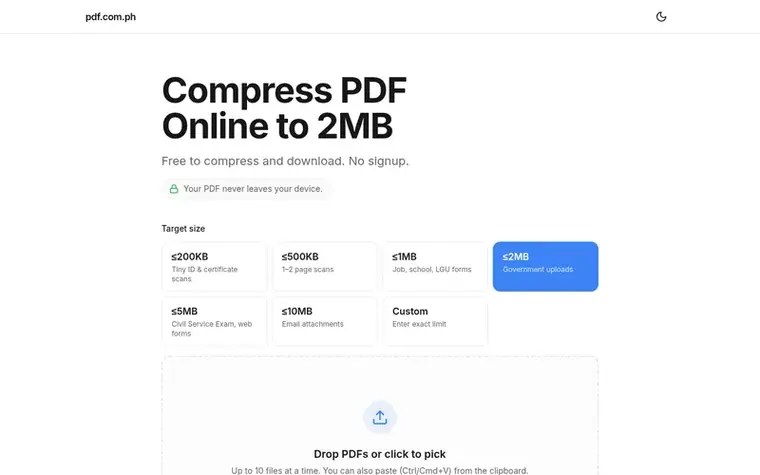
pdf.com.ph is a free browser-based PDF compressor built for Philippine government uploads. The tool compresses PDFs entirely in your browser using JavaScript, so files never leave your device and nothing is uploaded to any server. It offers preset compression sizes tailored to specific Philippine government agencies like SEC eFAST, BIR, SSS, PhilHealth, Pag-IBIG, and Civil Service Exam portals, as well as custom size options from 0.1MB to 100MB. The service works on mobile devices and preserves text and visible signatures with moderate compression levels. It is completely free to use with no signup or subscription required, and operates on a voluntary tip model via GCash.
Pricing model: Free
Free to use with optional GCash tips
No. Your PDF is read and compressed entirely inside your browser using JavaScript. Nothing is sent to any server, not even filenames or page counts.
You can choose from preset sizes of 200KB, 500KB, 1MB, 2MB (default), 5MB, 10MB, or enter a custom value between 0.1MB and 100MB. Each agency page starts with a size suited to that portal.
Yes. The tool is mobile-first and runs in Safari and Chrome, though very large PDFs over 100MB may run into memory limits on older phones.
Moderate compression preserves text and visible signatures. Extreme compression far under 500KB can blur fine scanned details, so pick the largest size your agency accepts.
No. It's free to compress and download, with no signup and no subscription. You can send an optional tip via GCash if it saved you time.
No review of pdf.com.ph set in type yet. Set the first.
Reviews are free to set. None are paid for. Read the proofs
Readers' notes · Reprints · Share the page · Your company in print? Claim it · Report a misprint
pdf.com.ph has a free listing. The owner can unlock the full profile with a paid launch for $5:
 ReadHere
A free browser-based reader for PDFs and EPUBs with highlights, notes, and offline access. All files are stored locally on your device.
 PDFtoMD
Convert PDF to MD in seconds
 FirstClickTools
70+ free online tools for PDF, image, video, and file processing that run entirely in your browser
 Aservus
Free online PDF tools and utilities that process files locally in your browser
Can we set one analytics cookie to count which pages readers flip to? Nothing is set unless you say yes. Privacy