Ahrefs Domain Rating set in type 25 Oct 2026, reset 25 Oct 2026.
PdfCompare metrics
Set in type for pdfcompare.app: Ahrefs Domain Rating and Majestic link data, with the change since the last edition.
Metric
Value
Domain Rating
14● no change since last check
Trust Flow
9● no change since last check
Citation Flow
29● no change since last check
Referring domains
56● no change since last check
External backlinks
3,443● no change since last check
Ahrefs Domain Rating set in type 25 Oct 2026, reset 25 Oct 2026. Lead topic: Regional/Asia (9). Majestic set 25 Oct 2026, reset 25 Oct 2026. Link data typeset by Majestic. Trust Flow, Citation Flow and Topical Trust Flow are trademarks of Majestic-12 Ltd.
PdfCompare domain colophon
From the registry's public RDAP record, checked 25 Oct 2026, 14:52 UTC.
A browser-based tool for reviewing text changes and visual differences between two PDFs without uploading documents or creating an account.
The story so far
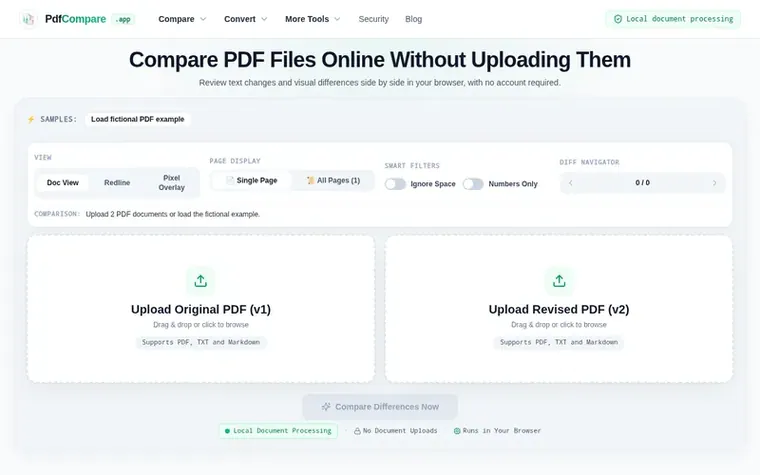
Homepage of PdfCompare
PdfCompare is a web-based utility that compares two PDF documents by analyzing text differences and visual page changes. Users upload or load two versions of a document and select from three comparison modes: Doc View for side-by-side text review, Redline for highlighting added and deleted words, or Pixel Overlay for detecting image and layout changes. All processing happens locally in the browser without sending documents to a remote server. The tool also exports text comparison reports and supports comparing scanned PDFs visually, though word-level changes require an existing readable text layer.
Open the original PDF in the first slot and the revised PDF in the second, then select Compare Differences Now. Use Doc View to review the documents side by side, Redline for added and deleted words, or Pixel Overlay for visual changes.
Does PdfCompare upload or store my PDF files?
PdfCompare processes PDF document data locally in your browser. Document bytes are not uploaded to a remote processing server or stored in a cloud document account.
What is the difference between text and visual PDF comparison?
Text comparison highlights added and deleted words from the readable text layer of a PDF. Visual comparison renders PDF pages as images and compares their pixels, which can reveal changed images, moved stamps and layout shifts.
Can I compare scanned PDF documents?
Scanned PDFs can be inspected with Pixel Overlay. Word highlighting requires an existing readable text layer, such as one added by OCR software. PdfCompare does not perform OCR.
Can I run PdfCompare completely offline?
Yes. Once the web application is loaded in your browser, the service worker caches compiled WebAssembly assets. You can disconnect your network and continue diffing documents with zero loss in performance.
Find PdfCompare online
Leave a review for PdfCompare
No review of PdfCompare set in type yet. Set the first.
 ReadHere
 PDFtoMD
 FirstClickTools
 Aservus