Ahrefs Domain Rating set in type 17 Oct 2026, reset 16 Oct 2026.
DrawDog metrics
Set in type for drawdog.art: Ahrefs Domain Rating and Majestic link data, with the change since the last edition.
Metric
Value
Domain Rating
1▲ +1 (up) since last check
Trust Flow
0● no change since last check
Citation Flow
19● no change since last check
Referring domains
24● no change since last check
External backlinks
25● no change since last check
Ahrefs Domain Rating set in type 17 Oct 2026, reset 16 Oct 2026. Majestic set 13 Oct 2026, reset 13 Oct 2026. Link data typeset by Majestic. Trust Flow, Citation Flow and Topical Trust Flow are trademarks of Majestic-12 Ltd.
DrawDog domain colophon
From the registry's public RDAP record, checked 16 Oct 2026, 14:17 UTC.
Software that records how a drawing or writing session came together and issues a signed, timestamped certificate clients can verify in their browser.
The story so far
Homepage of DrawDog
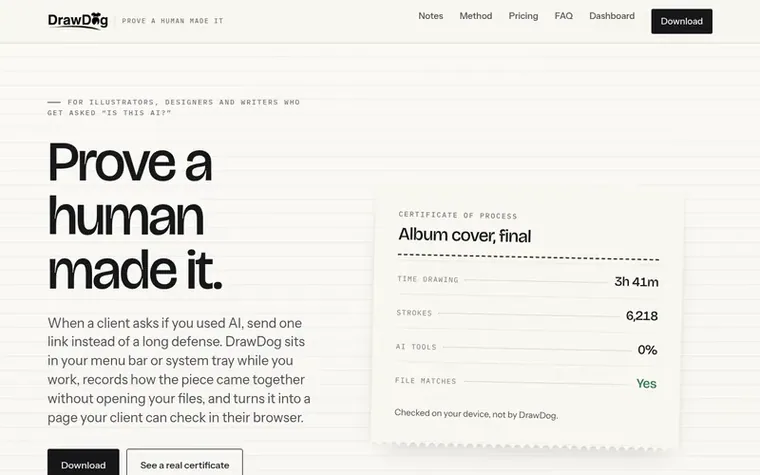
DrawDog sits in your menu bar or system tray while you work, recording how a piece came together without opening your files. It turns this record into a signed, timestamped certificate that shows how long you worked, how your file grew from start to finish, and what percentage of AI tools were open during the session. Clients can verify the certificate in their browser without any account or installation. The app watches file growth, application focus, and pen rhythm, but never reads file contents, names, or keystrokes. It works with drawing apps like Photoshop and Procreate, writing apps like Word and Scrivener, and supports external tablets like Wacom. The certificate comes in three grades: Certified human-made, Human-made with AI help, or Recorded, not certified.
Typeset features
Records file growth between saves without opening file contents
Tracks which applications were in front during work
Counts pen strokes and monitors pen rhythm
Generates signed, timestamped certificates clients verify in browser
Works with any drawing app including Photoshop, Clip Studio Paint, Figma, and Krita
Supports writing apps: Word, Pages, Scrivener, Ulysses, Obsidian
Works with external tablets: Wacom, Huion, XP-Pen, Cintiq
Browser-based Procreate file sealing without installation at drawdog.art/seal
Detects desktop AI apps by name: ChatGPT, Claude, Midjourney, Ollama, ComfyUI and 130 total app recognitions
Pricing
Pricing model: Freemium
Free: 3 certificates a month. Pro: $19 per month for unlimited certificates and two registered computers. Studio: $39 per month for everything in Pro plus studio branding on certificates and five registered computers.
DrawDog proves that a piece of work took shape on your computer over time by hand with no AI tools open. It records how the work was made, never what it looks like, and gives you a signed, timestamped certificate a client can check in their browser. It is a record of process, not an AI detector.
Can a certificate be faked?
Yes, one way: generate an image elsewhere and then reproduce it by hand in a watched folder. The record would be genuine because a genuine process happened. Nothing can catch that. DrawDog makes faking the work cost about as much as doing the work.
Which computers and operating systems does DrawDog work on?
DrawDog works on Mac (Apple Silicon and Intel, macOS 12 or later) and Windows 10 or 11 (64-bit). Linux is not yet supported.
How much drawing is required for a certificate to say 'Certified human-made'?
At least 5 minutes of pen or mouse activity inside a drawing app, at least 150 strokes, and a rhythm that rises and falls like a hand's rather than a script's. Most real sessions clear this in the first ten minutes.
Does DrawDog read my keystrokes or record my screen?
No. DrawDog never reads keystrokes and never records the screen. It never asks for the permissions that would allow either. For writing, it is graded on how the file grew, which is visible without touching the keyboard: a typed chapter appears in small steps over an hour; a pasted one appears in a single jump.
Find DrawDog online
Leave a review for DrawDog
No review of DrawDog set in type yet. Set the first.

 AIQualityHQ
 Clever AI Detector
 Inquio