Ahrefs Domain Rating set in type 2 Nov 2026, reset 29 Oct 2026.
Free tool to convert bank and credit card statements from PDF, scans or photos into Excel or CSV spreadsheets, with automatic verification against the
The story so far
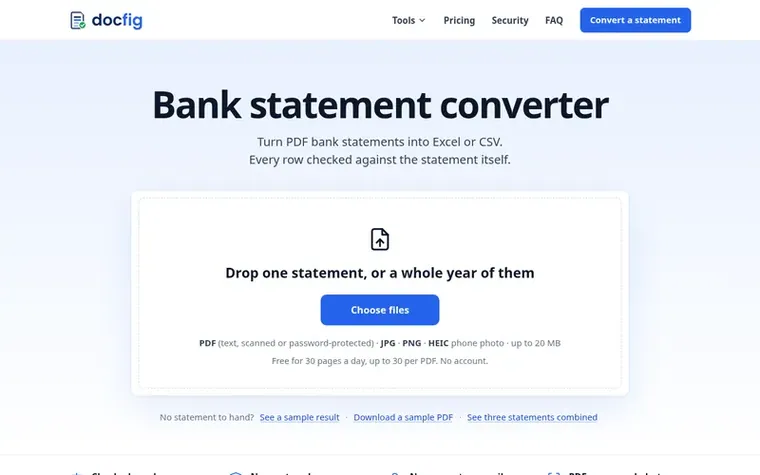
Homepage of DocFig
DocFig is a bank statement converter that transforms PDF bank and credit card statements, scans, and phone photos into structured Excel workbooks or CSV files. Each transaction row is automatically verified against the statement's own arithmetic, including running balances, opening and closing balances, and printed totals, highlighting any discrepancies so users can identify and fix errors before using the data.
The tool handles statements from any bank or card issuer, supporting various formats including text PDFs, scanned images, password-protected files, and photos. It can process American, British, Indian and European statement layouts, managing different date formats, debit and credit columns, DR and CR markers, decimal commas, and Indian digit grouping. Users can convert up to 24 statements at once, which are automatically combined into a single workbook per account with overlapping transactions deduplicated and missing months identified.
Files are held in memory during conversion and never stored on disk. Account and card numbers are masked before processing by the AI model, and nothing is retained after the result reaches the user's browser. The service requires no account creation, no email signup, and no login credentials. Free use allows 30 pages per day up to 30 pages per file, while paid plans starting at $9 per month add monthly page allowances.
Typeset features
Convert bank statements from PDF, scans or photos to Excel or CSV
Automatically verify each row against statement balances and totals
Combine up to 24 statements into one workbook per account
Support for text PDFs, scanned PDFs and password-protected files
OCR for scans and photos in JPG, PNG or HEIC
Handle various statement formats including debit/credit columns, DR/CR markers, decimal commas and Indian digit grouping
No account or login required
Files held in memory and never stored on disk
Support for credit card statements with purchases as money out and payments as money in
Highlight rows that do not add up with explanation of the error
Pricing
Free: 30 pages per day. Starter: $9/month for 150 pages per month ($86/year with 20% off). Pro: $19/month for 500 pages per month ($182/year with 20% off). Business: $49/month for 2,000 pages per month ($470/year with 20% off).
DocFig metrics
Set in type for docfig.com: Ahrefs Domain Rating and Majestic link data, with the change since the last edition.
Metric
Value
Domain Rating
0● no change since last check
Trust Flow
3● no change since last check
Citation Flow
7● no change since last check
Referring domains
3● no change since last check
External backlinks
3● no change since last check
Ahrefs Domain Rating set in type 2 Nov 2026, reset 29 Oct 2026. Lead topic: Recreation/Food (3). Majestic set 29 Oct 2026, reset 29 Oct 2026. Link data typeset by Majestic. Trust Flow, Citation Flow and Topical Trust Flow are trademarks of Majestic-12 Ltd.
DocFig domain colophon
Read the colophon
From the registry's public RDAP record, checked 2 Nov 2026, 19:17 UTC.
Measured after DocFig went live on Zivaro Launch on 29 October 2026.
Domain Rating (Ahrefs)
0● no change since launch
0 at launch (29 Oct 2026), 0 on 2 Nov 2026
Referring domains (Majestic)
3
First measured 29 Oct 2026
Day 4 since launch. Next receipt: day 30, 28 Nov 2026. These are measurements, not proof of cause: many things move these numbers. Figures we have not measured are left out.
Yes. Each connection can convert up to 30 pages a day without an account or email, with up to 30 pages and 20 MB per file. For more, paid plans add a monthly pool of pages: Starter is $9 a month for 150 pages, Pro $19 for 500 and Business $49 for 2,000, with 20% off yearly.
Can I convert several statements at once?
Yes. You can choose or drop up to 24 files together. Each is converted and checked, then joined into one workbook per account in date order. DocFig checks that each statement's closing balance matches the next one's opening balance, names any missing month, and keeps a transaction once when two statements overlap, listing the removed copies on their own sheet.
How accurate is the conversion?
Every row is checked against the statement's own arithmetic: the running balance on each line, the opening and closing balance, and any printed totals. Each amount must also appear in the page text. When something does not add up, the row is highlighted with the reason.
Is my statement uploaded and stored?
Yes, the file is sent over HTTPS to the DocFig server and held in memory while it is converted, but never written to disk. Account and card numbers are masked before the text is passed to the AI model. Nothing is kept after the result reaches your browser.
Can I convert a scanned statement or a photo of a statement?
Yes. Scanned PDFs and photos saved as JPG, PNG or HEIC are read with OCR and then checked like any other statement. A flat, sharp, well-lit image converts best.
Leave a review for DocFig
No review of DocFig set in type yet. Set the first.

 LoreAI
 PhoEdit
 EasyMake.ai
 MiniImgTools