Ahrefs Domain Rating set in type 17 Nov 2026, reset 17 Nov 2026.
Doc2X translates PDFs into 12 languages while preserving the original layout, formulas and tables. It converts PDFs to editable formats and answers questions
The story so far
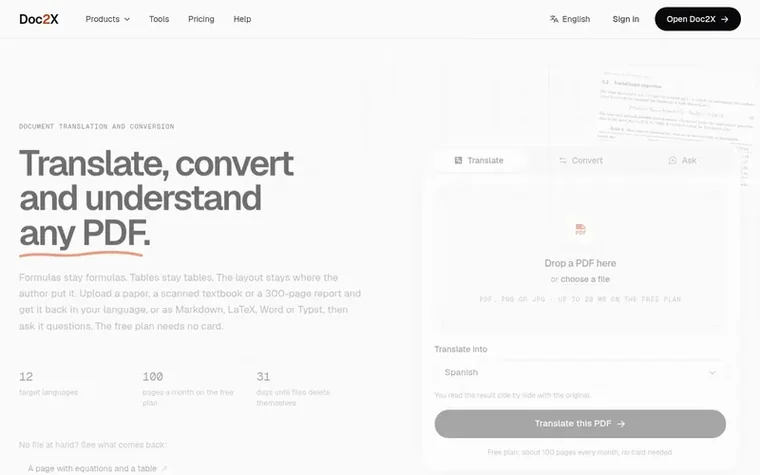
Homepage of Doc2X
Doc2X is an AI-powered document tool that translates PDFs into 12 languages while keeping the original layout, equations, and tables intact. It rebuilds the page structure first—reading order, equations as LaTeX, and tables as rows and cells—then applies translation to that structure.
The service works on both digital and scanned PDFs, with OCR handling print, formulas and tables. Beyond translation, users can convert PDFs to Word, Markdown, LaTeX or Typst with editable equations and tables. Doc2X also allows users to ask questions about translated or converted documents, with answers that cite the specific pages they come from.
The free plan provides 50 credits monthly (about 100 translated pages or 200 converted pages) with no card required. Paid plans starting at $9.90/month offer stronger translation models, larger file sizes, and additional features like glossaries and image generation.
Typeset features
Translate PDFs into 12 languages while preserving layout and formatting
Convert PDFs to Word, Markdown, LaTeX or Typst with editable equations and tables
Process scanned PDFs with OCR that handles formulas and tables
Ask questions about documents with page citations
Bilingual PDF reader with side-by-side original and translation
Create slide decks from documents or notes for PowerPoint export
Generate images from descriptions on paid plans
Free browser tools for PDF and image manipulation
Translation with whole document context on paid plans
Custom glossaries for consistent term translation
Pricing
Free: 50 credits/month (about 100 translated or 200 converted pages). Starter: $9.90/month or $99/year (1,500 credits/month, up to 3,000 translated or 6,000 converted pages). Pro: $24.90/month or $199/year (4,500 credits/month, up to 9,000 translated or 18,000 converted pages).
Want to see what Doc2X does next? Follow them for milestones, new products and stories by email.
Doc2X metrics
Set in type for doc2x.com: Ahrefs Domain Rating and Majestic link data, with the change since the last edition.
Metric
Value
Domain Rating
27● no change since last check
Trust Flow
1● no change since last check
Citation Flow
17● no change since last check
Referring domains
30● no change since last check
External backlinks
146● no change since last check
Ahrefs Domain Rating set in type 17 Nov 2026, reset 17 Nov 2026. Lead topic: Business (1). Majestic set 17 Nov 2026, reset 17 Nov 2026. Link data typeset by Majestic. Trust Flow, Citation Flow and Topical Trust Flow are trademarks of Majestic-12 Ltd.
Doc2X domain colophon
Read the colophon
From the registry's public RDAP record, checked 17 Nov 2026, 14:50 UTC.
Measured after Doc2X went live on Zivaro Launch on 17 November 2026.
Domain Rating (Ahrefs)
27
First measured 17 Nov 2026
Trust Flow (Majestic)
1
First measured 17 Nov 2026
Referring domains (Majestic)
30
First measured 17 Nov 2026
Day 0 since launch. Next receipt: day 30, 17 Dec 2026. These are measurements, not proof of cause: many things move these numbers. Figures we have not measured are left out.
What makes Doc2X different from pasting a PDF into a chatbot?
A chatbot reads the text layer and guesses at the rest. Doc2X first rebuilds the page, understanding reading order across columns, every equation as LaTeX, and every table as rows and cells. The translation is then set back into that structure, so formulas come out as formulas and tables keep their columns.
Does it work on scanned PDFs?
Yes. Scanned pages are read with OCR that handles print, formulas and tables. The translation is set into the scanned page as real text you can select and search.
Which languages can I translate into?
Twelve targets: English, Spanish, Portuguese (Brazil and Portugal), German, French, Italian, Japanese, Korean, Simplified and Traditional Chinese, and Russian (which is in beta). The interface itself is available in 11 languages.
What do I get back from Doc2X?
From a translation: a translated PDF keeping the original layout, on its own or side by side with the original. Starter and Pro plans can also export the translation as Word, Markdown, LaTeX or Typst. From a conversion on any plan: the document as Word, Markdown, LaTeX or Typst with editable equations and tables.
Can I ask questions about a PDF?
Yes. Open a document you have translated or converted and ask in your own language. The answer is written from the document, names the pages it draws on, and clicking a page number takes you there. The answer says when the document does not contain the information.
Leave a review for Doc2X
No review of Doc2X set in type yet. Set the first.

 DocuHook
 Usetulvo
 MammothPDF
 PagedPDF