How do I compare two Word documents online?
Choose the original DOCX file and the revised DOCX file, then click Compare Documents. The result highlights added, removed, and changed text in split or unified view.
PDF tools
Free browser-based tool to compare DOCX files and see text changes side by side
Ahrefs Domain Rating set in type 25 Oct 2026, reset 18 Oct 2026.
| Metric | Value |
|---|---|
| Domain Rating | 11 no change since last check |
| Trust Flow | 18 no change since last check |
| Citation Flow | 29 no change since last check |
| Referring domains | 152 no change since last check |
| External backlinks | 826 no change since last check |
Ahrefs Domain Rating set in type 25 Oct 2026, reset 18 Oct 2026. Lead topic: Computers/Internet/On the Web (18). Majestic set 18 Oct 2026, reset 18 Oct 2026. Link data typeset by Majestic. Trust Flow, Citation Flow and Topical Trust Flow are trademarks of Majestic-12 Ltd.
| Domain age | 11 months |
|---|---|
| Registered | |
| Expires | |
| Registrar | Cloudflare, Inc. |
| DNSSEC | Not signed |
Compare2Word is a free online tool that lets you compare two DOCX documents in your browser and see added, removed, and rewritten text marked side by side
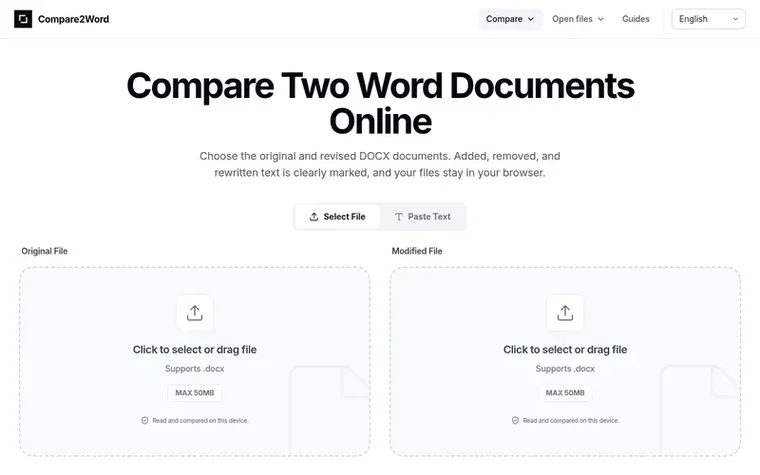
Compare2Word is a free, independent browser-based tool for comparing Word document text. Upload two DOCX files and the tool highlights added, removed, and rewritten wording in paragraphs, lists, and tables. You can view results in split view with both versions side by side, or unified view with all changes in one document.
All processing happens in your browser—files are never uploaded to a server. The tool works on Windows, macOS, Linux, and ChromeOS with any modern web browser. It does not compare fonts, page layout, images, or Word revision history.
Compare2Word handles files up to 50 MB and is designed for comparing contracts, reports, academic drafts, and other documents that go through multiple revisions. It requires no account creation, software installation, or Microsoft Word subscription.
Pricing model: Free
Choose the original DOCX file and the revised DOCX file, then click Compare Documents. The result highlights added, removed, and changed text in split or unified view.
It finds added, removed, and rewritten wording in paragraphs, lists, and tables. It does not compare fonts, page layout, images, comments, or Word revision history.
No. The documents are read and compared in your browser. We do not receive or store their contents.
No. Compare2Word runs in a modern web browser on Windows, macOS, Linux, and ChromeOS.
Each file can be up to 50 MB. Very long documents or files with many tables may be easier to compare in smaller sections.
No review of Compare2Word set in type yet. Set the first.
Reviews are free to set. None are paid for. Read the proofs
Readers' notes · Reprints · Share the page · Your company in print? Claim it · Report a misprint
Compare2Word has a free listing. The owner can unlock the full profile with a paid launch for $5:
 ReadHere
A free browser-based reader for PDFs and EPUBs with highlights, notes, and offline access. All files are stored locally on your device.
 PDFtoMD
Convert PDF to MD in seconds
 FirstClickTools
70+ free online tools for PDF, image, video, and file processing that run entirely in your browser
 Aservus
Free online PDF tools and utilities that process files locally in your browser
Can we set one analytics cookie to count which pages readers flip to? Nothing is set unless you say yes. Privacy