Ahrefs Domain Rating set in type 3 Nov 2026, reset 3 Nov 2026.
A free browser-based PDF booklet maker that rearranges pages for saddle-stitched printing without uploading files to a server.
The story so far
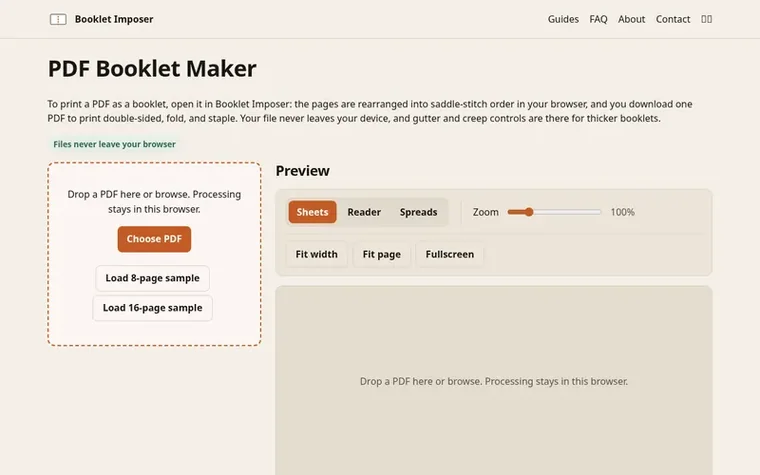
Homepage of Booklet Imposer
Booklet Imposer is a free web tool that converts PDFs into printable saddle-stitched booklets. The tool rearranges your PDF's pages in the correct order for printing double-sided and folding, so that once sheets are stacked, folded, and stapled, they read sequentially. All processing happens in your browser—files are never uploaded to a server or shared with anyone else.
The tool handles the mathematical complexity of page ordering automatically. For an 8-page booklet, it correctly places pages so that the outer sheet carries pages 8 and 1 on one side and pages 2 and 7 on the other. It adds blank pages if needed to reach a multiple of four (since each folded sheet holds four pages), and provides controls for gutter and creep to accommodate thicker booklets.
Features include a sheet preview showing the front and back of every page, spreads view to see the booklet as readers will, automatic paper size detection, and optional settings for bleeds and page rotation. The exported PDF is ready to print double-sided at actual size and fold.
Typeset features
Rearranges PDF pages into saddle-stitch order automatically
Spreads view to see booklet as reader will see it
Automatic blank page padding to multiple of four
Gutter control for text spacing near staples
Creep compensation for inner page alignment
Multiple paper size options with auto-sizing
Rotate back pages option for printer compatibility
Handles mixed page sizes with fitting options
Supports files up to 200 MB and 400 pages
Pricing
Pricing model: Free
Booklet Imposer metrics
Set in type for bookletimposer.com: Ahrefs Domain Rating and Majestic link data, with the change since the last edition.
Metric
Value
Domain Rating
0● no change since last check
Trust Flow
2● no change since last check
Citation Flow
24● no change since last check
Referring domains
11● no change since last check
External backlinks
35● no change since last check
Ahrefs Domain Rating set in type 3 Nov 2026, reset 3 Nov 2026. Lead topic: Society/Issues (2). Majestic set 3 Nov 2026, reset 3 Nov 2026. Link data typeset by Majestic. Trust Flow, Citation Flow and Topical Trust Flow are trademarks of Majestic-12 Ltd.
Booklet Imposer domain colophon
Read the colophon
From the registry's public RDAP record, checked 3 Nov 2026, 00:50 UTC.
Measured after Booklet Imposer went live on Zivaro Launch on 3 November 2026.
Domain Rating (Ahrefs)
0
First measured 3 Nov 2026
Referring domains (Majestic)
11
First measured 3 Nov 2026
Day 0 since launch. Next receipt: day 30, 3 Dec 2026. These are measurements, not proof of cause: many things move these numbers. Figures we have not measured are left out.
Open the PDF in Booklet Imposer, check the sheet preview, and export. Print the downloaded PDF double-sided with flip on short edge at 100% scale, keep your printer's booklet mode off, then fold the sheets together and staple through the fold.
Does my PDF get uploaded to a server?
No. Imposition runs in your browser, and the finished file is saved straight to your device. Your PDF is never sent to a server.
Why are blank pages added?
Each folded sheet holds four pages, so a saddle-stitched booklet needs a page count that is a multiple of four. If yours isn't, blank pages are added at the end.
Should I turn on my printer's booklet mode?
No. The exported PDF is already in booklet order. Turning on the printer's booklet mode would rearrange the pages a second time and scramble them.
Is it free to use?
Yes. Booklet Imposer is free to use, with no account, no sign-up, and no watermark. The site is supported by ads.
Leave a review for Booklet Imposer
No review of Booklet Imposer set in type yet. Set the first.

 LoreAI
 PhoEdit
 EasyMake.ai
 MiniImgTools