Do local conversions upload my 3D file?
No. This 3D model converter parses selected STL, OBJ, PLY, GLB, and glTF files in your browser for local routes. Unselected external dependencies are rejected instead of fetched.

File converters
Free, private, and secure online 3D model conversion
Ahrefs Domain Rating set in type 17 Oct 2026, reset 15 Oct 2026.
| Metric | Value |
|---|---|
| Domain Rating | 18 +14 (up) since last check |
| Trust Flow | 27 no change since last check |
| Citation Flow | 33 no change since last check |
| Referring domains | 29 no change since last check |
| External backlinks | 5,841 no change since last check |
Ahrefs Domain Rating set in type 17 Oct 2026, reset 15 Oct 2026. Lead topic: Computers/Software/Operating Systems (27). Majestic set 14 Oct 2026, reset 14 Oct 2026. Link data typeset by Majestic. Trust Flow, Citation Flow and Topical Trust Flow are trademarks of Majestic-12 Ltd.
| Domain age | 2 months |
|---|---|
| Registered | |
| Expires | |
| Registrar | Spaceship, Inc. |
| DNSSEC | Not signed |
Browser-local 3D model converter for STL, OBJ, PLY, GLB and glTF formats with before-and-after validation and no file upload required.
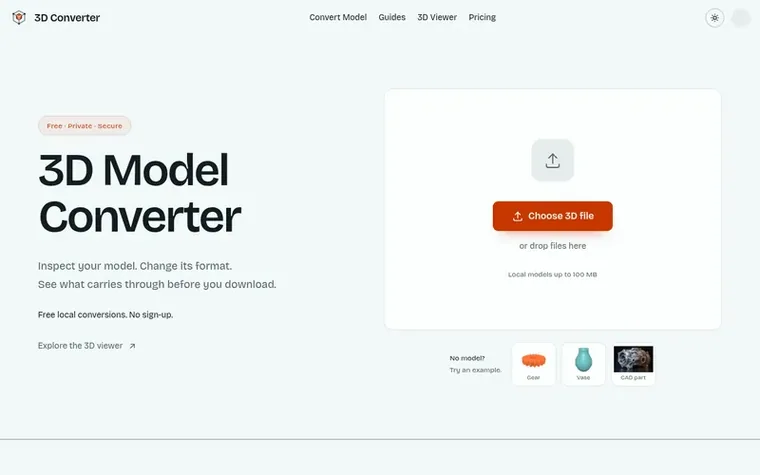
3D Converter is a browser-based tool for converting between 3D file formats including STL, OBJ, PLY, GLB, and glTF. It processes files locally on your device without uploading to external servers, supporting formats commonly used in 3D printing, modeling, and web delivery.
The tool includes a 3D viewer to inspect models before conversion and provides detailed before-and-after validation reports comparing dimensions, triangles, materials, textures, and other properties. It handles dependency-aware packages, allowing you to keep OBJ files with their MTL and texture references, or glTF files with their BIN and image files together.
A free plan offers unlimited browser-local conversions with 5 monthly cloud credits for CAD processing (STEP and IGES). The Pro plan at $9.9/month provides 100 cloud credits, STEP and IGES cloud conversion, and extended history retention.
Pricing model: Freemium
Free plan: Unlimited browser-local mesh workflows, 5 cloud credits per month, 50 MB per cloud file. Pro plan: $9.9/month for 100 cloud credits per month, STEP and IGES cloud conversion, 100 MB effective cloud file limit.
No. This 3D model converter parses selected STL, OBJ, PLY, GLB, and glTF files in your browser for local routes. Unselected external dependencies are rejected instead of fetched.
Yes. The browser-local conversion routes and 3D viewer are available without creating an account. The main local model file is limited to 100 MB; large dependency packages can still run into browser memory limits.
GLB is often the simplest delivery choice because it can package geometry, PBR materials, textures, hierarchy, and animation in one file. Choose glTF instead when readable JSON and separate resources make debugging easier.
Those formats can reference resources outside the main file. An OBJ may point to an MTL file and texture images. A glTF may point to BIN buffers and images. Select the complete package with the original file names.
STL and OBJ workflows often rely on external unit conventions, while glTF defines meters. A value of 1 can mean one millimeter in a slicer and one meter in a web scene. Compare the bounding-box dimensions and choose an explicit unit.
No review of 3D Converter set in type yet. Set the first.
Reviews are free to set. None are paid for. Read the proofs
Readers' notes · Reprints · Share the page · Your company in print? Claim it · Report a misprint
3D Converter has a free listing. The owner can unlock the full profile with a paid launch for $5:
 HeicToPng
Free HEIC to PNG converter that runs entirely in your browser with no uploads or daily limits
 TikTokio
Free TikTok video downloader without watermark in under 5 seconds
 markitdown.ai
Convert documents and web pages into Markdown for AI workflows
 tapirconvert
Free online video converter with no limits, no watermark, no uploads
Can we set one analytics cookie to count which pages readers flip to? Nothing is set unless you say yes. Privacy